
The best student laptop in NZ for a big screen on a budget is the MOMENTPLUS 16-inch, which pairs a 1920 x 1200 FHD panel with 16GB of DDR4 RAM and a 512GB NVMe SSD in a chassis just 1.9cm thick. Screen size and weight pull against each other, though, and a New Zealand student is usually carrying the thing onto a bus and up a hill, so a 16-inch pick only makes sense if it mostly lives on a desk.
The best student laptop in NZ depends on budget, whether classwork runs through a browser or needs full Windows software, and how much weight a student wants to carry every day. This guide covers nine laptops and Chromebooks, from budget-friendly picks under 1.5kg to a stronger all-rounder with a proper Intel Core i5 chip.
Every pick below has been checked against real New Zealand and Australian retailer listings, tech reviews, and genuine owner feedback, not just spec sheets. Each entry covers the design, the trade-offs, and who it actually suits, so shoppers can match a laptop to how their student really works.
Chromebooks make up more than half of this list, because they suit the way most NZ schools and universities now teach: Google Classroom, browser-based assignments, and cloud storage. Students who need specific Windows-only software or heavier multitasking should look at the Windows picks instead.
| Laptop | Best For | CPU | RAM / Storage | Screen |
|---|---|---|---|---|
| MOMENTPLUS 16″ Laptop | Big screen on a budget | Intel N95 | 16GB / 512GB SSD | 16″ FHD |
| HP 14 Laptop | Basic starter laptop | Intel Celeron N4120 | 4GB / 128GB eMMC | 14″ HD |
| HP 14s Laptop | Value for high school | Intel Celeron N4120 | 8GB / 256GB SSD | 14″ HD |
| Lenovo IdeaPad Slim 3 Chromebook | Lightweight Chromebook | MediaTek Kompanio 520 | 4GB / 64GB eMMC | 14″ Full HD |
| Lenovo IdeaPad Slim 3i | Best overall | Intel Core i5-13420H | 8GB / 512GB SSD | 14″ WUXGA |
| HP Chromebook 14a | Keyboard and audio | Intel Celeron N4120 | 4GB / eMMC | 14″ HD |
| Lenovo Chromebook Duet 11 | 2-in-1 for note-taking | MediaTek Kompanio 838 | 4GB / 128GB eMMC | 10.95″ WUXGA touch |
| ASUS Chromebook CM14 | Battery life | MediaTek Kompanio 520 | 4GB / 64GB eMMC | 14″ HD |
| ASUS Vivobook Go 15 | Big-screen value | Intel Pentium Silver N6000 | 8GB / 256GB SSD | 15.6″ FHD |
1. MOMENTPLUS Laptop – Best for a Big Screen on a Budget
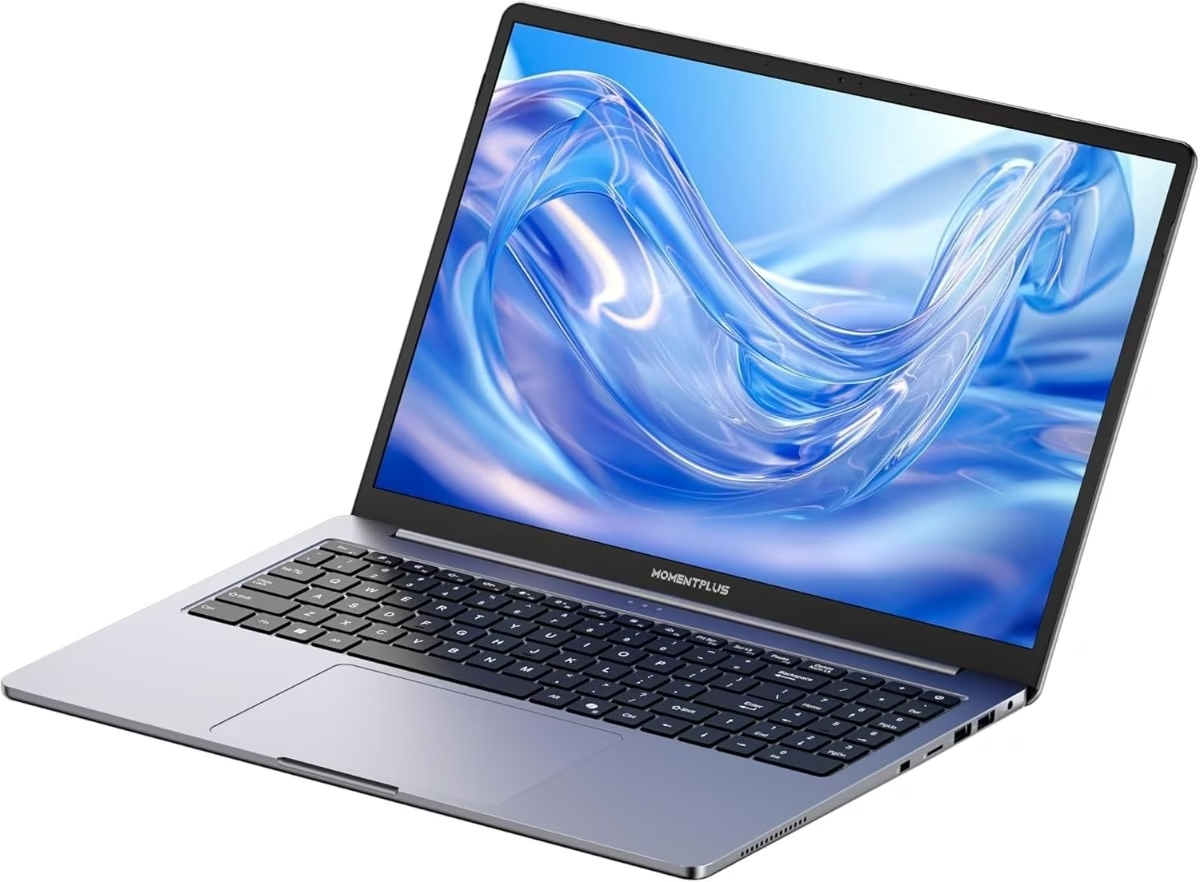
The MOMENTPLUS 16-inch laptop is the pick for students who want the largest screen and the most memory on this list without paying for a premium brand. It ships with 16GB of DDR4 RAM and a 512GB NVMe SSD, both well above what most budget laptops offer at this size.
The chassis measures a slim 1.9cm thick and opens to a full 135-degree recline, with a 16-inch FHD panel running at 1920 x 1200. The dark, understated shell carries a backlit keyboard, useful for late-night assignments, and there is no touchscreen or fingerprint reader.
Build quality follows typical budget conventions: a mostly plastic shell with a metal-reinforced base, rather than the aluminium unibody found on pricier machines. The Intel N95 quad-core chip (up to 3.4GHz) and 6000mAh battery are enough for browser-based study, streaming lectures, and word processing, though this is not a laptop for video editing or serious multitasking.
The bigger trade-off is availability. MOMENTPLUS is an import-market brand sold through Amazon and eBay Australia rather than any NZ or Australian retail chain, so there is no local service centre, and support runs through the seller rather than a shopfront.
Pros
- 16GB RAM and 512GB SSD, generous for the size and segment
- Large 16″ FHD (1920 x 1200) display
- Backlit keyboard for evening study
Cons
- No NZ or Australian retail presence; support is seller-based only
- No independent owner reviews yet to confirm long-term reliability
Key specs: model VIE16, Intel N95 quad-core (up to 3.4GHz), 16GB DDR4 RAM, 512GB NVMe SSD, 16″ FHD (1920 x 1200), backlit keyboard, Wi-Fi 5, Bluetooth 5.0, HDMI, USB-C 3.2, Windows 11 Pro.
2. HP 14 Laptop – Best Basic Starter Laptop
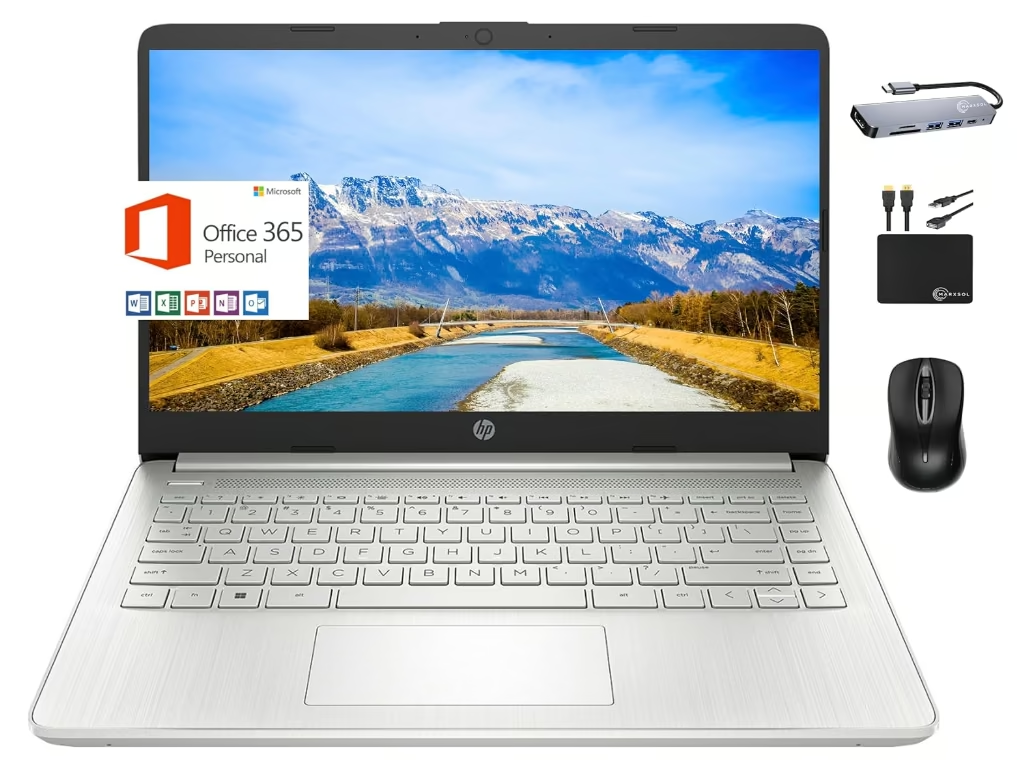
The HP 14 (model 14-dq0760dx) is a straightforward starter laptop for a student who mostly needs email, web browsing, and basic word processing. Reviewers on PB Tech’s NZ listing describe it plainly as a “basic home computer for the family” rather than a machine built for heavy use.
The 14-inch chassis is light at roughly 1.47kg, with a micro-edge bezel and an anti-glare HD (1366 x 768) display. The Natural Silver finish is understated, with a compact keyboard deck and an HP True Vision webcam with dual-array microphones for video calls.
Build quality is typical of HP’s entry tier: a plastic shell that feels solid enough for a school bag but shows its budget positioning next to pricier HP ranges. The Intel Celeron N4120 processor, 4GB of RAM, and 128GB of eMMC storage handle Chrome tabs, Google Docs, and Microsoft Office comfortably one at a time, and one PB Tech reviewer even runs a small Minecraft server on it for their kids.
Where it struggles is anything beyond light use. Reviewers are consistent that it’s “not flash or fast,” and 4GB of RAM combined with eMMC storage means multitasking or larger downloads slow it down quickly. HP Fast Charge tops up the battery to 50% in about 45 minutes, which helps offset the modest battery life.
Pros
- Light and easy to carry at 1.47kg
- HP Fast Charge tops up quickly
- Handles basic schoolwork and video calls fine
Cons
- 4GB RAM and eMMC storage struggle with multitasking
- HD display is low-resolution by 2026 standards
Key specs: model 14-dq0760dx, Intel Celeron N4120, 4GB RAM, 128GB eMMC, 14″ HD (1366 x 768) anti-glare, Wi-Fi 5, Bluetooth 5, USB-C (data only), 2x USB-A, HDMI 1.4b, Windows 11 Home in S Mode.
3. HP 14s Laptop – Best Value for High School
The HP 14s (model 14s-dq0526TU, in the 8GB RAM / 256GB SSD configuration) is built for a student moving from intermediate into high school who needs more breathing room than the base HP 14 offers. One reviewer called it “a great entry product for student moving into high school,” and another described it as “very good laptop for my kids studies, affordable price.”
The 14-inch chassis weighs around 1.46kg, with a micro-edge, BrightView HD (1366 x 768) display and a Jet Black finish that looks tidier than most laptops in its class. The keyboard deck is full-size, and the whole unit feels light enough to carry daily without noticing the extra weight in a bag.
Build quality matches HP’s usual entry-level standard: a plastic chassis that holds up to daily handling but doesn’t pretend to be premium. The step up to 8GB of RAM and a 256GB SSD, versus the 4GB and eMMC combination on the base HP 14, makes a real difference in day-to-day responsiveness, particularly when switching between browser tabs and Office apps.
The trade-off is the Intel Celeron N4120 chip itself, which several reviewers note isn’t fast for anything beyond schoolwork, and the display resolution remains basic HD rather than Full HD. It also ships in Windows 11 Home S Mode, which limits app installs to the Microsoft Store until switched out.
Pros
- 8GB RAM and 256GB SSD are a genuine step up from entry Celeron laptops
- Light at 1.46kg
- Praised by NZ buyers as good value for high school
Cons
- Celeron N4120 CPU is still a budget-tier chip
- HD, not Full HD, display
- Ships in restrictive S Mode
Key specs: model 14s-dq0526TU, Intel Celeron N4120, 8GB RAM, 256GB SSD, 14″ HD (1366 x 768) BrightView, Wi-Fi 4, Bluetooth 4.2, USB-C, 2x USB-A, HDMI 1.4b, Windows 11 Home in S Mode.
4. Lenovo IdeaPad Slim 3 Chromebook – Best Lightweight Chromebook
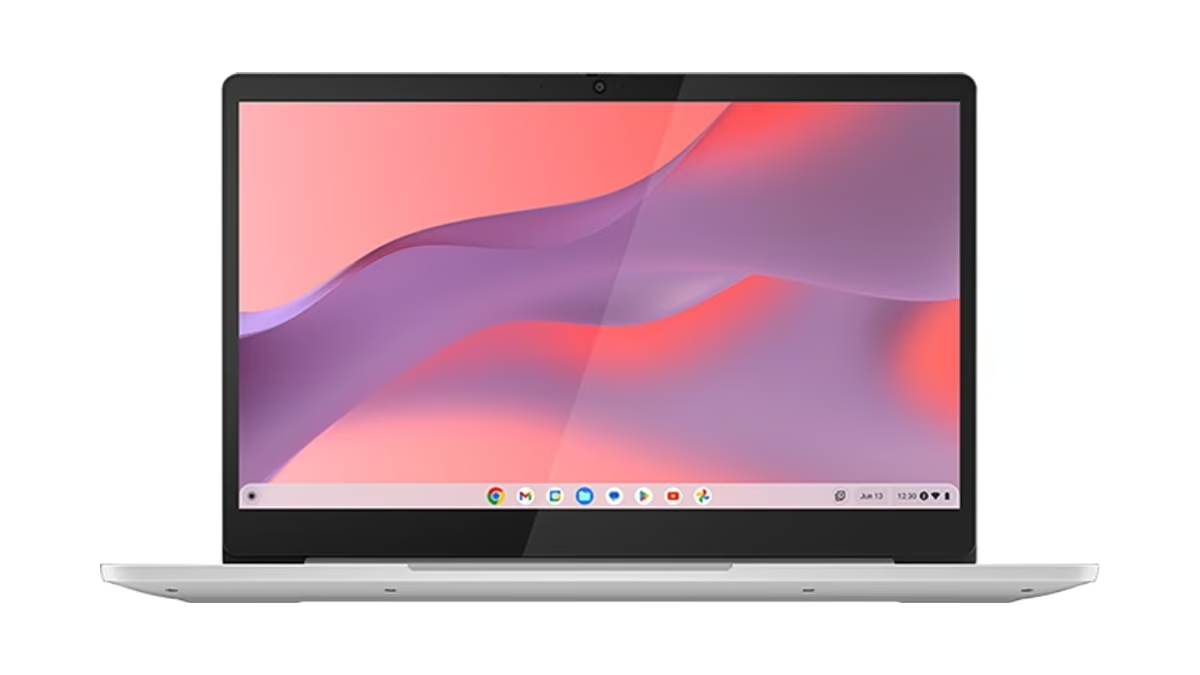
The Lenovo IdeaPad Slim 3 Chromebook is the pick for a student who wants all-day battery life in the lightest possible package. Reviewers testing this exact Kompanio 520 configuration recorded 11 to 14.5 hours of real-world battery life in lab testing, genuinely long enough to skip the charger for a full school day.
At around 1.3kg and just 18.5mm thick, it’s one of the lightest 14-inch devices on this list. NZ retail stocks it in Cloud Grey (the same model also ships in Abyss Blue through some import listings), with a plain plastic shell that keeps weight down rather than chasing a premium look.
Build quality is standard Chromebook fare: solid enough for a school bag, without the metal chassis found on pricier Lenovo ranges. The MediaTek Kompanio 520 processor and 4GB of RAM handle Chrome tabs, Google Docs, and streaming video without drama, and testers describe the keyboard’s typing feel as surprisingly solid for a budget device.
The trade-offs show up under pressure. Reviewers found the trackpad can misregister taps inconsistently on some units, and the 64GB eMMC storage fills up quickly with Android apps and is noticeably slower than an SSD. There is also no HDMI port and no keyboard backlight, so it’s not built for dark rooms.
Pros
- Excellent 11+ hour real-world battery life
- Very light at 1.3kg
- Solid typing feel for the price
Cons
- Trackpad can misregister taps
- 64GB eMMC storage is slow and fills up fast
- No HDMI port, no backlit keyboard
Key specs: 14″ Full HD IPS touchscreen (1920 x 1080), MediaTek Kompanio 520, 4GB RAM, 64GB eMMC, Wi-Fi 6, Bluetooth 5.1, USB-C, USB-A, microSD, no HDMI, ChromeOS.
5. Lenovo IdeaPad Slim 3i – Best Overall
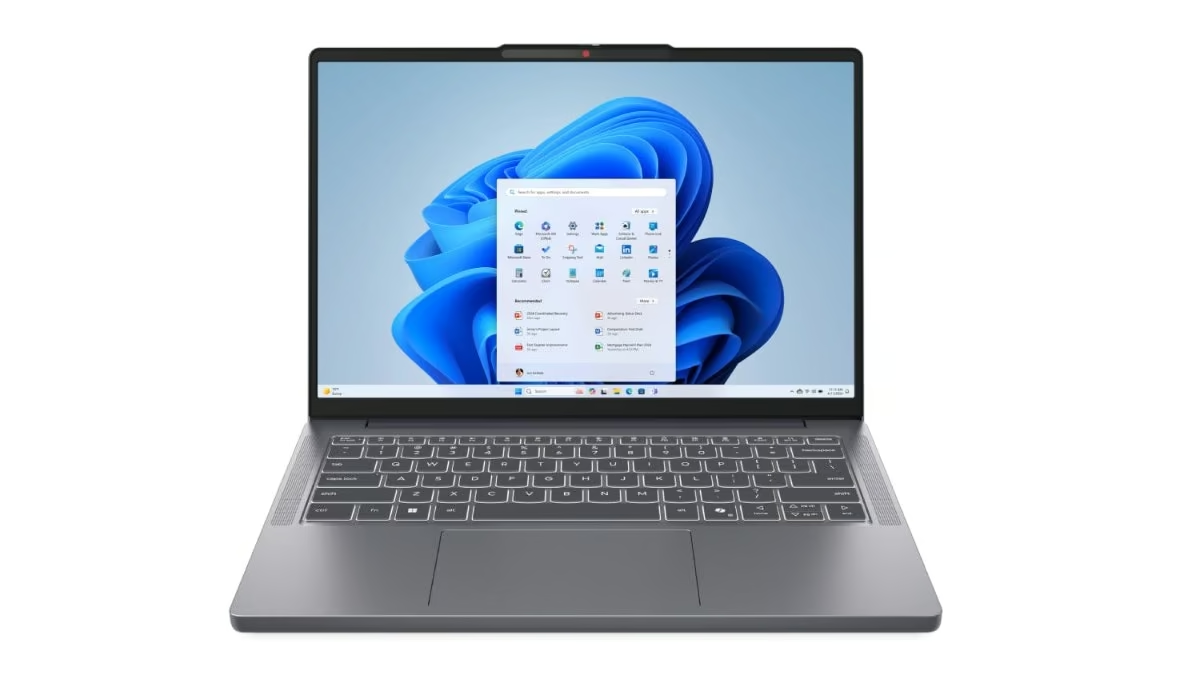
The Lenovo IdeaPad Slim 3i (14IRH10) is the strongest all-rounder on this list, built around a proper Intel Core i5-13420H rather than the entry-level chips found on most of the other picks. Reviewers describe the chassis as slim and durable, calling out a “tough device build” for a laptop in this price bracket.
The 14-inch shell weighs 1.4kg and comes in a Luna Grey finish with a WUXGA (1920 x 1200) IPS display running at 300 nits. It’s a 16:10 panel, so there’s more vertical space for documents and spreadsheets than the standard 16:9 screens found on most competitors.
Build quality holds up well against daily student use, and the 8-core i5-13420H chip (4 performance cores plus 4 efficiency cores) paired with 512GB of PCIe SSD storage means multitasking, browser-heavy research, and even light coding or spreadsheet work stay smooth. Reviewers also note above-average stereo speakers for a laptop in this class.
The main compromises are the display and keyboard. Testers call the 300-nit panel dim and dull compared with rivals, and there’s no backlit keyboard, a real drawback for evening study sessions. Graphics are limited to integrated Intel UHD, so it’s not suited to gaming or GPU-heavy creative work.
Pros
- Genuinely capable i5-13420H CPU handles real multitasking
- Roomy 16:10 WUXGA display
- 512GB SSD is generous for the price
Cons
- Display brightness and contrast are dim by reviewers’ own account
- No backlit keyboard
- Integrated graphics only
Key specs: model 83K0000YAU, Intel Core i5-13420H, 8GB DDR5 RAM, 512GB PCIe SSD, 14″ WUXGA (1920 x 1200) IPS, Wi-Fi 6, Bluetooth 5.2, USB-C, USB-A, HDMI, Windows 11 Home.
6. HP Chromebook 14a – Best Keyboard and Audio
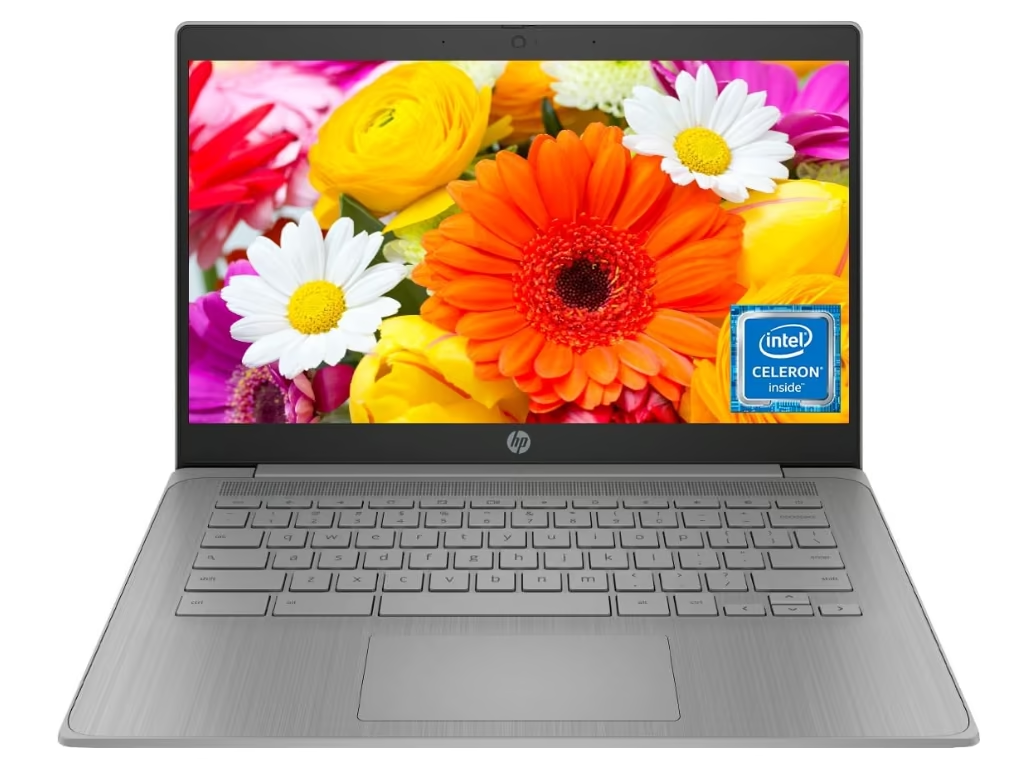
The HP Chromebook 14a (14a-na0702ds) stands out on this list for its full-size backlit keyboard with a numeric keypad, a feature most budget Chromebooks skip entirely. One NZ buyer called the colour “beautiful” and said it was “easy to use for school kids.”
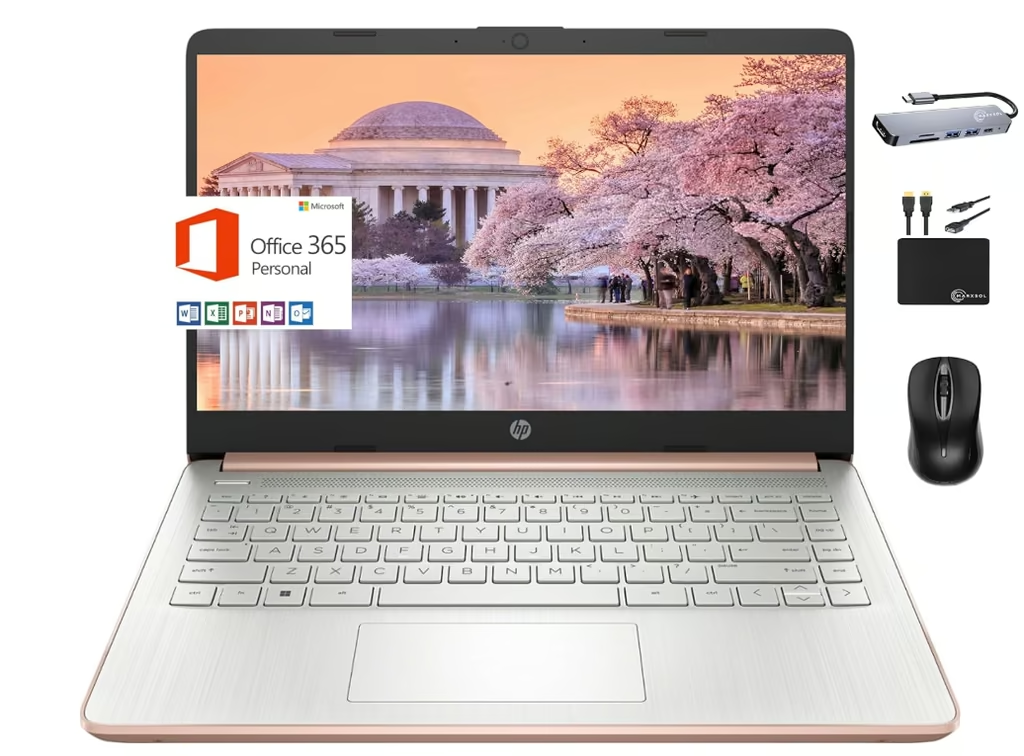
The 14-inch chassis weighs about 1.47kg in a Pale Rose Gold finish, with an HP Imagepad multi-touch trackpad and dual speakers tuned by Bang & Olufsen, a genuine step up in audio quality for video calls and media. The micro-edge HD (1366 x 768) display keeps bezels slim, though it isn’t a touchscreen.
Build quality is consistent with HP’s budget Chromebook line: light, plastic-bodied, and built to survive a school bag rather than impress. The Intel Celeron N4120 and 4GB of RAM handle ChromeOS multitasking well for basic study, and HP’s fast charging tops up roughly 50% of the 47Wh battery in 45 minutes.
Reviewers note it gets “a little laggy” if a student tries to game on it, which is expected at this spec level. Buyers should also check current stock, since the specific unit sourced for this review is a factory-remanufactured model rather than new stock, and eMMC storage configurations can vary between 64GB and 128GB depending on where it’s bought.
Pros
- Rare full-size backlit keyboard with numeric keypad
- Bang & Olufsen-tuned speakers
- Light and easy for school kids to use
Cons
- Gets laggy under any gaming load
- Non-touch, low-res HD display
- Stock is often refurbished or remanufactured, so check availability and exact storage configuration before buying
Key specs: model 14a-na0702ds, Intel Celeron N4120, 4GB RAM, eMMC storage (64-128GB depending on configuration), 14″ HD (1366 x 768), backlit keyboard with numeric keypad, Bang & Olufsen speakers, Wi-Fi, Bluetooth 5, ChromeOS.
7. Lenovo Chromebook Duet 11 – Best 2-in-1 for Note-Taking
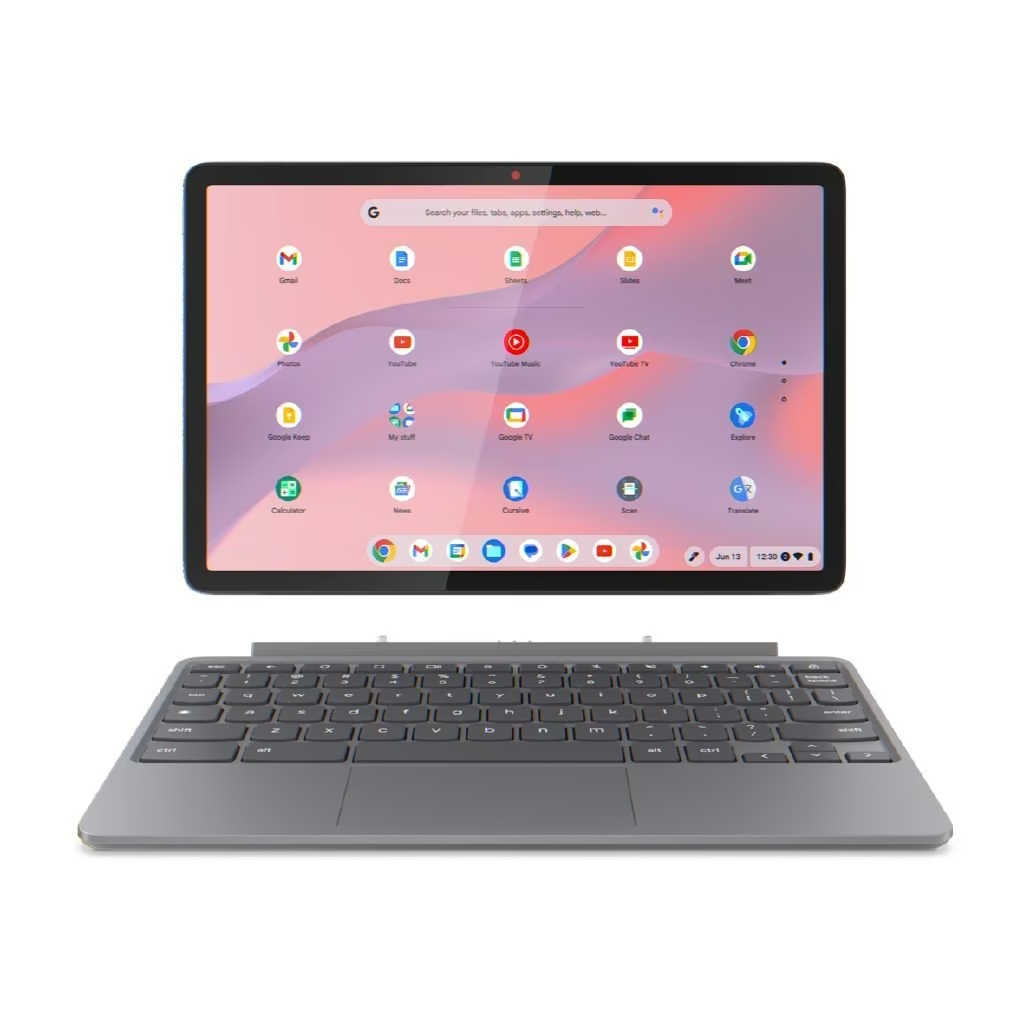
The Lenovo Chromebook Duet 11 is the pick for a student who wants a genuine 2-in-1, detaching from its folio keyboard case to work as an 11-inch tablet for note-taking with a USI stylus. Reviewers measured just under 10 hours of continuous battery life in lab testing, enough for a full day of classes.
At 510g for the tablet alone, and about 943g with the keyboard case attached, it’s the most portable device on this list. The Luna Grey aluminium tablet has a WUXGA (1920 x 1200) IPS touchscreen rated at 400 nits, bright enough to use outdoors on campus, with a kickstand-style design under the folio case.
Build quality feels more premium than most Chromebooks here, thanks to the aluminium tablet body, and the 5MP front and 8MP rear cameras (both with a physical privacy shutter) are noticeably sharper than typical laptop webcams. The MediaTek Kompanio 838 processor with its NPU keeps ChromeOS multitasking smooth across ten or more open tabs.
The compromises come from the tablet-first design. Reviewers describe the folio keyboard as “mushy” with shallow key travel, and the small trackpad built into the case makes precise cursor work harder, so a Bluetooth mouse is worth adding for detailed tasks. Only two USB-C ports are available, meaning a hub is needed for anything beyond basic peripherals.
Pros
- Genuinely detachable 2-in-1 with stylus support
- Sharp 5MP/8MP cameras with privacy shutters
- Very light and portable
Cons
- Folio keyboard feels mushy with shallow travel
- Small trackpad
- Only two USB-C ports, so a hub is needed for extra peripherals
Key specs: model 83HH0005AU, MediaTek Kompanio 838, 4GB RAM, 128GB eMMC, 10.95″ WUXGA (1920 x 1200) touchscreen, 5MP/8MP cameras, USI stylus support, Wi-Fi, Bluetooth, ChromeOS.
8. ASUS Chromebook CM14 – Best Battery Life
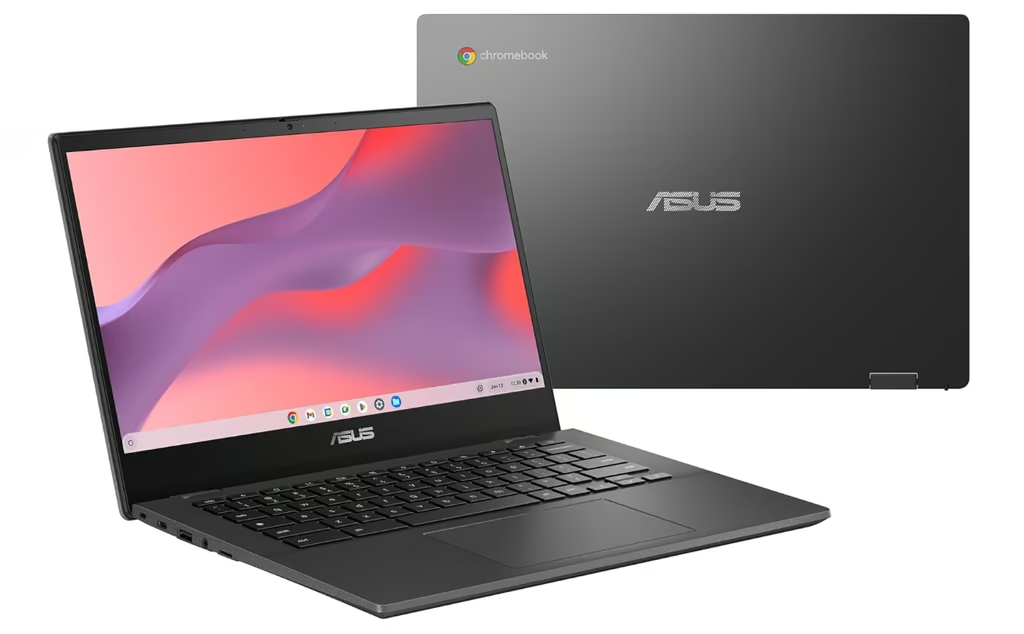
The ASUS Chromebook CM14 (CM1402CM2A-DS44) is aimed at a student who prioritises battery life above almost everything else. A hands-on review recorded 9 hours and 26 minutes in a standardised battery test, beating a rival reviewer’s own top student-Chromebook pick in the same benchmark, and a full recharge from flat takes about four hours.
The 14-inch chassis weighs 1.45kg in an understated black finish, with a lid that reclines the full 180 degrees for flexible use on a desk or a lap. The build uses partially recycled materials and feels reasonably solid, though the lid hinge is a little flimsy compared with pricier Chromebooks.
Typing is a genuine highlight: reviewers praise the well-spaced, low-profile keys as pleasant to use for long study sessions. The MediaTek Kompanio 520 chip and 4GB of RAM handle light browsing, 2K video playback, and even casual games like Clash of Clans reasonably well.
The display and trackpad are the weak points. The tested unit’s HD (1366 x 768) panel looks noticeably soft and washes out badly off-angle, and the trackpad generates too much friction, with the cursor either lagging or drifting past where a finger stops. Multitasking beyond a couple of light apps causes stutters and occasional crashes with only 4GB of RAM on board.
Pros
- Excellent battery life for a budget Chromebook, beating pricier rivals in testing
- Light 1.45kg build
- Pleasant typing experience
Cons
- Display looks soft and washes out at an angle
- Trackpad is imprecise and can frustrate
- Only 4GB RAM causes stutters under multitasking
Key specs: model CM1402CM2A-DS44, MediaTek Kompanio 520, 4GB RAM, 64GB eMMC, 14″ HD (1366 x 768) anti-glare, Wi-Fi 6, Bluetooth 5.3, USB-A, 2x USB-C, microSD, ChromeOS.
9. ASUS Vivobook Go 15 – Best Big-Screen Value
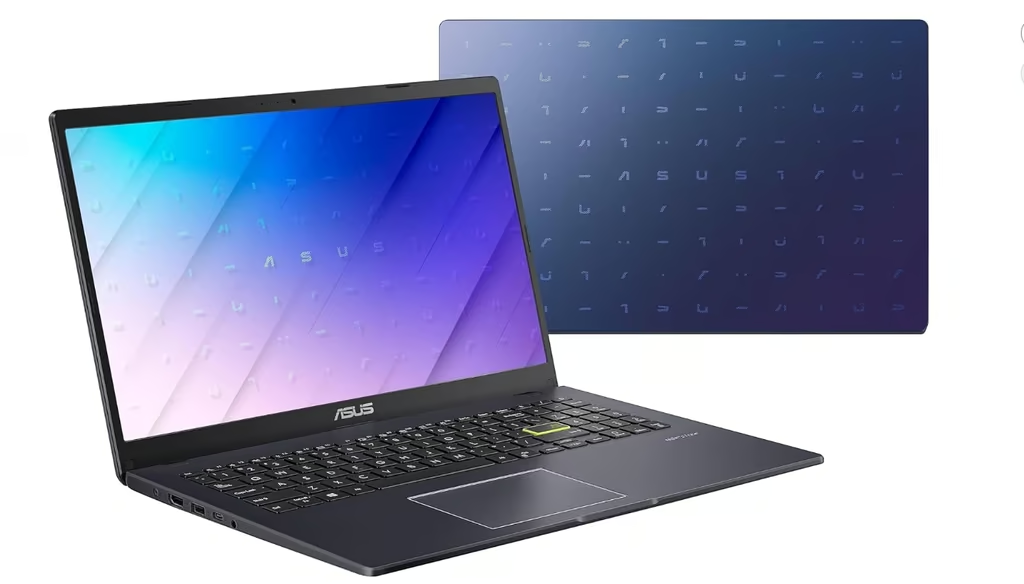
The ASUS Vivobook Go 15 (E510KA-EJ134W) is the pick for a student who wants a bigger 15.6-inch screen without stepping up to a heavier, pricier laptop. ASUS’s own spec sheet lists an 84% screen-to-body ratio thanks to NanoEdge thin bezels, so the extra screen size doesn’t come with a bulky footprint.
At 1.57kg, it’s noticeably heavier than the 14-inch Chromebooks on this list but still manageable in a daypack. The Peacock Blue iridescent finish stands out from the usual black and silver laptop crowd, and the lid opens a full 180 degrees flat, useful for group study or presenting a screen across a table.
Build quality is plastic-bodied rather than metal, which keeps weight and cost down but means it won’t feel as sturdy in hand as an aluminium-chassis laptop. The Intel Pentium Silver N6000 chip and 8GB of RAM are enough for browser-based coursework, Office apps, and streaming, and the fanless design keeps it silent in a library or classroom.
The RAM is soldered and capped at 8GB, so there’s no upgrading later, and light multitasking can push it close to capacity even without heavy apps running. The 256GB SSD is a reasonable size for schoolwork, backed by a spare M.2 slot for anyone who wants to add more storage themselves.
Pros
- Bigger 15.6″ FHD screen with slim NanoEdge bezels
- Fanless and silent
- Spare M.2 slot for future storage upgrades
Cons
- Plastic chassis feels less sturdy than metal-bodied rivals
- RAM is soldered and capped at 8GB
Key specs: model E510KA-EJ134W, Intel Pentium Silver N6000, 8GB DDR4 RAM, 256GB SSD (plus spare M.2 slot), 15.6″ FHD (1920 x 1080), Wi-Fi 5, Bluetooth 5.1, USB-C, 2x USB-A, HDMI, Windows 11 Home.
How to Choose a Student Laptop
Start with software, not specs. If a student’s school or course runs on Google Classroom and browser-based tools, a Chromebook covers most needs at a lower cost. Students who need Windows-only software, like certain accounting, engineering, or design programmes, should choose a Windows laptop instead.
RAM matters more than most students realise. 8GB is enough for browser-based work and Office apps, but 16GB gives more breathing room for heavier multitasking, and it’s worth checking whether the RAM is soldered before buying, since several picks on this list can’t be upgraded later.
Battery life should be judged on real-world testing, not the manufacturer’s claimed number. Many NZ schools don’t allow charging cables to be left running as a trip hazard, so a laptop that genuinely lasts a full school day, ideally eight hours or more, saves a lot of hunting for power points. Students who spend long days on campus without easy access to a power point might also want one of the best power banks as backup.
Screen size and weight come down to how far the laptop travels each day. An 11 to 14-inch screen under 1.5kg is easiest to carry in a school bag, while a 15.6-inch screen like the ASUS Vivobook Go 15 suits a student who mostly studies at a desk. Anyone who wants something even lighter than a laptop might compare these picks against the best tablets first.
A comfortable study setup matters beyond the laptop itself. Pairing a laptop with one of the best office chairs makes long study sessions easier on posture. A second screen from the best computer monitors roundup also gives more workspace for research and assignments side by side.
Finally, check the exact storage type. An SSD is faster and more reliable long-term than eMMC storage, which several budget picks on this list use to keep costs down.
Studying happens at kitchen tables and library desks that were never set at the right height, which is a stronger case for adjustable laptop stands than any office is. Student pricing is not always the cheapest route, and it is worth checking the general affordable laptop market before assuming an education discount wins.
Verdict
There’s no single best student laptop for every shopper, but the Lenovo IdeaPad Slim 3i stands out as the strongest all-rounder here, thanks to its proper Intel Core i5-13420H chip and roomy WUXGA display. Students whose coursework runs mostly through a browser will get excellent value and battery life from the Lenovo IdeaPad Slim 3 Chromebook or the ASUS Chromebook CM14, while the Lenovo Chromebook Duet 11 suits anyone who wants a genuine 2-in-1 for note-taking.
Budget-focused shoppers comparing the two HP 14 models should lean toward the HP 14s with its extra RAM and storage, and anyone wanting the biggest screen for the least outlay should look at the MOMENTPLUS 16-inch or the ASUS Vivobook Go 15, keeping in mind the MOMENTPLUS comes without local NZ retail support.
Whichever pick suits, checking the exact RAM, storage type, and battery life against how a student actually works, rather than the marketing headline, is the surest way to avoid a laptop that struggles by mid-semester.
Frequently Asked Questions
How much RAM does a student need in a laptop?
Most students manage fine with 8GB of RAM for browser-based coursework, Google Docs, and Office apps. Heavier multitaskers, or students studying computer science, engineering, or design, benefit from 16GB. Since many budget laptops have RAM soldered to the motherboard, it’s worth checking whether it’s upgradeable before buying, since 8GB can’t always be increased later.
Is a Chromebook good enough for university or high school?
A Chromebook covers most coursework well if classes use Google Classroom, browser-based research, and cloud storage. It becomes a poor fit for students who need specific Windows-only software, such as certain engineering, accounting, or design programmes, since web app versions don’t always match the full desktop features.
How long should a student laptop’s battery last?
Real-world testing matters more than a manufacturer’s claimed figure. Since many NZ schools don’t allow charging cables to run during the day as a trip hazard, a laptop that genuinely lasts around eight hours or more on a single charge covers a full day of classes without needing a power point.
What screen size and weight is best for a student laptop?
An 11 to 14-inch screen under 1.5kg is easiest to carry daily in a school bag, while a 15.6-inch screen suits a student who studies mostly at a desk and values extra workspace over portability. Weight matters more than most buyers expect once a laptop is carried every day.
Do NZ schools require Windows laptops, or are Chromebooks accepted?
Most NZ schools accept both Windows laptops and Chromebooks under their BYOD policies, but requirements vary by school and by subject. It’s worth checking a school’s specific BYOD device list before buying, since some senior subjects require Windows-only software that a Chromebook cannot run.
How much storage does a student laptop need?
A 256GB SSD comfortably covers schoolwork, downloads, and software installs, while budget Chromebooks with 64GB to 128GB of eMMC storage work well for students who rely mainly on cloud storage like Google Drive. An SSD is faster and more reliable long-term than eMMC, which several budget picks use to cut costs.
