
The best cheap tablet in NZ overall is the Samsung Galaxy Tab A11, an 8.7-inch model with a sharp 1536 x 2048 display, 64GB of storage and 4GB of RAM, which covers streaming, browsing, e-books and video calls without flagship pricing. For most buyers here that means a second screen for TVNZ+ or Netflix, a few games and some reading, so screen quality and battery life matter far more than raw processing power.
The best cheap tablet can be a great replacement for your laptop if it covers the everyday things you actually need one for. Some tablets do this better than others, but there are plenty of solid budget-friendly options available in New Zealand.
Inexpensive tablets are perfect for jobs that don’t require too much power and aren’t necessarily high resolution, but they still do the trick when it comes to entertainment, browsing, or playing basic games.
When it comes to buying a cheap tablet, ask yourself first what you actually need it for. Do you need to read books, take notes, play games, or watch movies? Pick according to that need — for example, if you want to watch movies or play games, look for a tablet with a higher resolution and a 10-inch (or bigger) display.
What Are Cheap Tablets Ideal For?
There are many options available for tablets that fit your needs without costing too much money. Pick a good budget tablet and you’ll find it perfectly capable of tasks like homework, watching movies, playing games, reading, browsing the web, and more.
They’re fine for browsing the internet and you can use any browser on a cheap tablet, but some of the very cheapest models can feel sluggish for browsing after a while.
Cheap tablets are good for reading if you get at least a 7-inch screen or bigger. You can easily adjust the brightness to suit your eyes’ comfort, but on a very cheap model the resolution may be a little low.
You can play any video on a cheap tablet through a media player app, but a low-resolution display won’t give you the best viewing experience. We’ve focused on good-resolution displays at a budget price below.
Even the cheapest tablets come with built-in front and rear cameras — the front camera is fine for video calling if you have enough light around you, and the rear camera can take decent close-up photos.
They all connect over WiFi, and battery life on this list is generally solid, though none of these are built for heavy 3D or high-resolution gaming — they’re best suited to kids or everyday, basic use.
The Best Cheap Tablets NZ
1. Samsung Galaxy Tab A11 8.7″
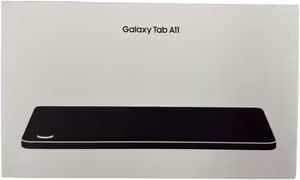
If you’d rather stick with a proper big-name brand, the Samsung Galaxy Tab A11 is the pick. It’s a compact 8.7-inch tablet with a sharp 1536×2048 display, 64GB of storage, and 4GB of RAM — enough for streaming, browsing, e-books, and video calls. It’s sold and shipped directly by Amazon AU, backed by Samsung’s usual software support, and the smaller 8.7″ size makes it easy to hold one-handed or slip into a bag. The trade-off is a smaller screen than some of the other picks here, so if you want a bigger canvas for movies, look further down this list.
2. Lenovo Idea Tab 11″ 2.5K with Pen
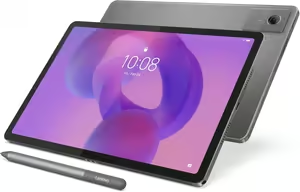
The Lenovo Idea Tab 11″ is the most premium tablet on this list, and it shows — a 2.5K (2560×1600) 90Hz display, a MediaTek Dimensity 6300 octa-core processor, four Dolby Atmos-tuned speakers, and a 7040mAh battery good for up to 12 hours of video streaming. It also comes bundled with a Lenovo Tab Pen for note-taking, sketching, and annotating PDFs, which makes it a genuinely useful step up if you want to use the tablet for more than just entertainment. Since it’s the most premium pick here, it isn’t the one to reach for if rock-bottom pricing is your main priority, but it’s the best-specced tablet in this lineup by a clear margin.
3. Lenovo Tab 10.1″ FHD
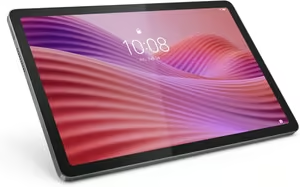
An Amazon’s Choice pick, the Lenovo Tab 10.1″ FHD pairs a MediaTek Helio G85 processor and 4GB of RAM with a 10.1-inch Full HD (1920×1080) display that’s certified for low blue light, so it’s comfortable for long streaming or reading sessions. It comes with 128GB of storage (expandable via microSD), up to 9.5 hours of battery life, 15W fast charging, and a clear case with a built-in kickstand included in the box — a genuinely well-rounded all-rounder for everyday use.
4. BNCF Bpad 13″ Large Screen Tablet
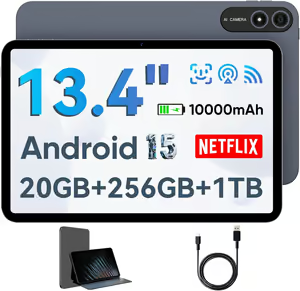
If screen size is the priority, the BNCF Bpad 13″ has the biggest display on this list at 13.4 inches, with a 1920×1200 FHD+ panel and Widevine L1 certification for genuine HD Netflix streaming. It runs Android 15 on a Unisoc T615 octa-core chip, has 256GB of storage (expandable to 1TB), a huge 10,000mAh battery, dual rear cameras, and ships with a protective case included. The listing advertises 20GB of RAM, but on a chip in this class that figure almost certainly includes virtual/extended memory rather than being all physical RAM, so treat multitasking performance as solid rather than flagship-level. It’s also a lesser-known brand rather than an established name, which is the trade-off for that much screen at this price point.
5. 2-in-1 Tablet with Keyboard, Mouse & Stylus
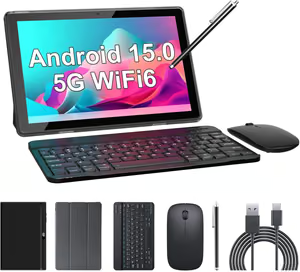
This is the best value pick if you want more than just a tablet out of the box — it comes bundled with a Bluetooth keyboard, a wireless mouse, a stylus pen, and a case, effectively turning the 10.1-inch tablet into a basic laptop replacement for students or anyone doing light office work. It runs Android with a quad-core processor, 8GB of RAM (including 5GB of expandable memory, disclosed upfront rather than hidden), 32GB of storage expandable to 1TB, and a 6000mAh battery good for over 10 hours of use. The display resolution (1280×800) is modest and the base storage is on the smaller side, but for the accessories included, it’s hard to match.
6. BYYBUO 10.1″ Metal Body Tablet
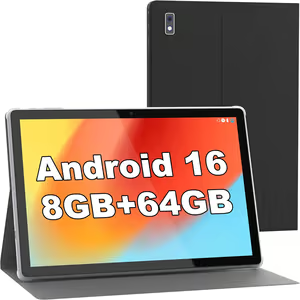
The BYYBUO stands out for its all-metal unibody design, giving it a noticeably more premium feel than most tablets at this price. It runs Android 16 with 8GB of RAM (3GB physical plus 5GB expandable), 64GB of storage expandable up to 1TB, a 10.1-inch IPS display, WiFi 6, Bluetooth 5.4, and a 5000mAh battery rated for up to 12 hours of use. A case is included in the box, and with well over a thousand ratings behind it, it’s a well-proven budget pick for everyday browsing, reading, and streaming.
7. ZZB ZB10 10″ Tablet
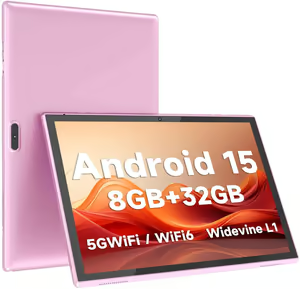
For the tightest budget, the ZZB ZB10 is the most-reviewed tablet on this entire list, with thousands of ratings behind it. It’s a straightforward 10.1-inch IPS tablet running Android 15 on a quad-core chip, with 8GB of RAM (including 5GB expandable), 32GB of storage expandable to 1TB, dual cameras, and a 6000mAh battery good for up to 12 hours of use. It won’t handle demanding games or heavy multitasking, but for browsing, reading, video calls, and streaming, it’s a solid, no-frills entry point — and a good option for kids or as a secondary household tablet.
There’s no single best cheap tablet for everyone, only the right one for what you’ll actually use it for. If you want a proper big-name brand behind the purchase, the Samsung Galaxy Tab A11 is the safest bet. If you want to use the tablet for note-taking or sketching as well as entertainment, the Lenovo Idea Tab 11″ with its included pen is the most capable pick here, while the Lenovo Tab 10.1″ FHD is the best all-round choice for everyday streaming and browsing.
For a bigger screen on a budget, the BNCF Bpad 13″ is the one to go for, and the 2-in-1 bundle with keyboard, mouse and stylus is hard to beat if you want a basic laptop replacement for study or light office work. If you’re after the tightest possible budget, both the BYYBUO and the ZZB ZB10 are solid, well-reviewed entry points — just keep your expectations in check for heavy gaming or multitasking, and remember that quoted RAM figures on budget tablets often include expandable/virtual memory rather than being all physical RAM.
To finish the desk setup, the guides to webcams and Chromebooks are worth a look.
Stretching a little past this bracket buys noticeably more, and the affordable tablet picks add RAM and screen quality for around a hundred dollars more.
Frequently Asked Questions
Is a cheap tablet good enough for Netflix and streaming?
Yes, for the most part. Any tablet on this list with a Full HD or 2.5K display (like the Lenovo Tab 10.1″ FHD or Lenovo Idea Tab 11″) will handle Netflix, YouTube and other streaming apps comfortably. Lower-resolution budget tablets still stream fine, but the picture will look noticeably softer on a bigger screen.
What does “8GB RAM (including 5GB expandable)” actually mean?
Several budget tablets on this list quote a total RAM figure that combines a smaller amount of physical RAM with extra virtual memory borrowed from storage. It’s not the same as genuine physical RAM, and it won’t perform like a true 8GB device under heavy multitasking, but it’s an honest way of listing the spec rather than hiding it — treat the physical RAM number as the more realistic one for judging performance.
Can you use a cheap tablet for work or study?
For light tasks like email, documents, video calls and web-based study tools, yes — especially a model like the 2-in-1 bundle that comes with a keyboard and mouse included. For anything more demanding, such as heavy spreadsheet work or video editing, a laptop is still the better tool.
How much storage do I need on a budget tablet?
32GB is workable if you mostly stream content rather than download it, since apps and the OS itself take up a good chunk of that. 64GB or 128GB gives more breathing room for downloaded videos, games and photos. Every tablet on this list supports microSD expansion, so you can add storage cheaply later rather than paying more upfront.
Do cheap Android tablets get software updates?
This varies a lot by brand. Samsung and Lenovo generally offer more consistent software support than smaller, lesser-known brands, which may receive few or no updates after purchase. If long-term software support matters to you, it’s worth favouring the more established brand names on this list.
Is it worth paying more for a big-name brand like Samsung over a budget brand?
It depends on your priorities. A big-name brand typically means better build quality, more consistent software updates and easier warranty support. A budget or lesser-known brand can still be genuinely good value for basic browsing, reading and streaming, but tends to cut corners on long-term support and performance headroom.
