
The best wifi router in NZ overall is the TP-Link Archer AX72, a Wi-Fi 6 router that covers most homes with fast, reliable speeds without stepping up to a mesh system or a premium price.
Choosing a router depends on the connection it needs to handle and the size of the home it needs to cover. This guide compares seven routers currently available, from a straightforward Wi-Fi 6 all-rounder to a gaming router, a VDSL modem combo, a travel router and a mesh system, judged on wireless standard, speed, ports and coverage rather than spec sheets alone.
Each pick lists an honest trade-off alongside what it does well, because a router built for gaming and one built for whole-home coverage solve different problems. Use the comparison table for a quick overview, then read the full picks. Anyone with dead spots already might also want to check the guide to WiFi extenders.
Quick comparison
| Rank | Router | Best for |
|---|---|---|
| 1 | TP-Link Archer AX72 | Best overall |
| 2 | NETGEAR RAX10 (4-Stream AX1800) | Best budget Wi-Fi 6 |
| 3 | ASUS TUF Gaming BE3600 | Best for gaming |
| 4 | D-Link DSL-X3052E | Best modem router combo for VDSL/ADSL connections |
| 5 | GL.iNet Opal (GL-SFT1200) | Best travel/portable router |
| 6 | TP-Link Archer BE550 | Best premium / Wi-Fi 7 |
| 7 | TP-Link Deco X20 | Best mesh system for whole-home coverage |
1. TP-Link Archer AX72 – Best overall
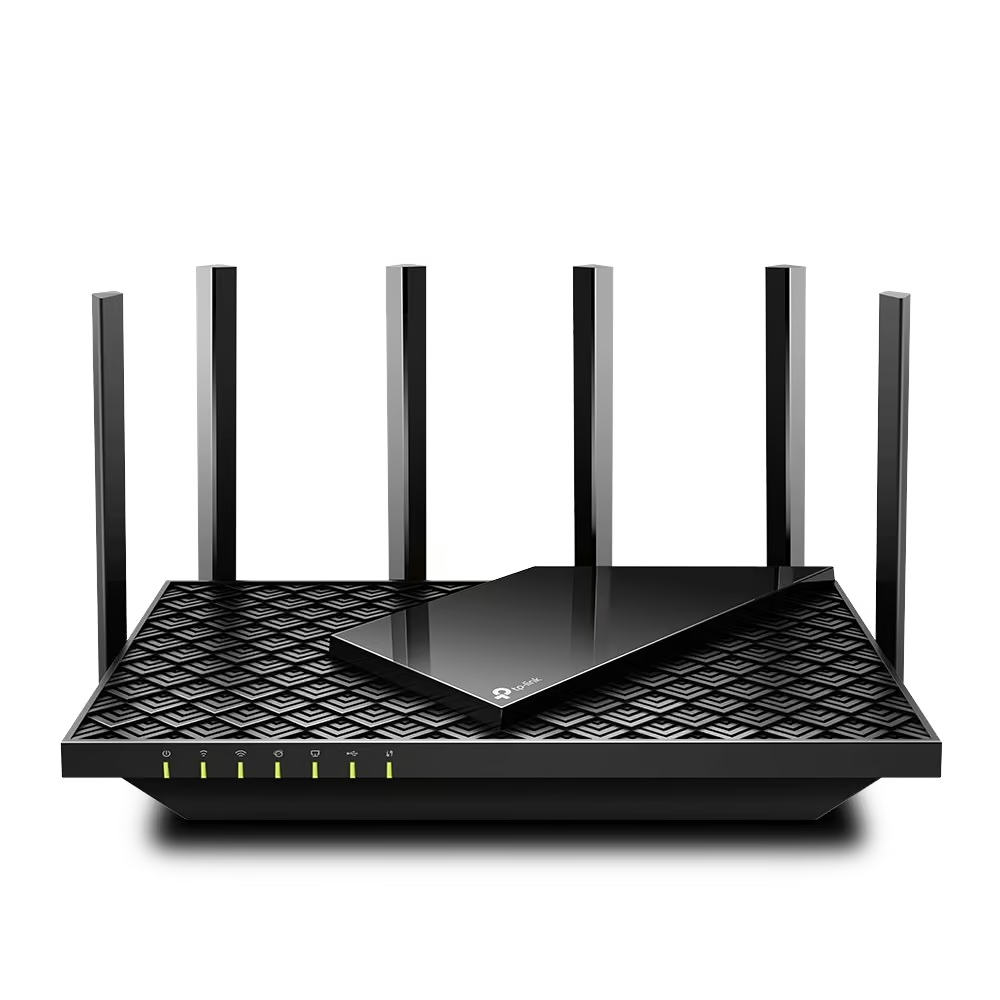
A genuinely fast, easy-to-live-with Wi-Fi 6 upgrade that will suit most Kiwi homes without breaking the bank. The Archer AX72 wears TP-Link’s familiar Archer look, a glossy black slanted top panel etched with a scaled, diamond-textured pattern for heat dissipation, flanked by six fixed external antennas that fan out for wide coverage. It is not a small unit, wanting its own shelf space rather than tucking behind a TV. Around the back sit four Gigabit LAN ports, one Gigabit WAN port and a USB 3.0 port for basic file or printer sharing, all fine for UFB fibre connections up to a gigabit but a step behind routers offering a 2.5G port for households on faster plans. Wi-Fi 6 (802.11ax) delivers
This AX5400 dual-band speeds, up to 4804Mbps on the 160MHz-capable 5GHz band and 574Mbps on 2.4GHz, backed by 4T4R MU-MIMO and OFDMA across eight spatial streams so more devices can be handled at once without everything slowing down. TP-Link rates it for typical three-bedroom homes, with coverage up to around 150 square metres. Setup runs through the Tether app or a browser, and TP-Link’s HomeShield adds network security and parental controls, though the fuller HomeShield Pro feature set requires a paid subscription. The genuine trade-off is no multi-gig port, and one buyer noted needing help beyond the app for more advanced configuration. Overall a solid, no-fuss workhorse for a busy fibre household.
Pros
- Strong Wi-Fi 6 speeds with AX5400 dual-band and 160MHz support on the 5GHz band
- Six antennas plus beamforming and high-power FEM give wide, reliable coverage for larger homes
- Easy Tether app setup with HomeShield security and parental controls built in
Cons
- No 2.5G multi-gig port, only Gigabit Ethernet
- Full HomeShield Pro security and parental features sit behind a paid subscription
- Large footprint with six fixed antennas needs open shelf space, not compact
Key specs: Wi-Fi 6 (802.11ax) dual-band AX5400, 8 spatial streams, 5x Gigabit ports (1 WAN/4 LAN) + 1x USB 3.0, model Archer AX72.
2. NETGEAR RAX10 (4-Stream AX1800) – Best budget Wi-Fi 6
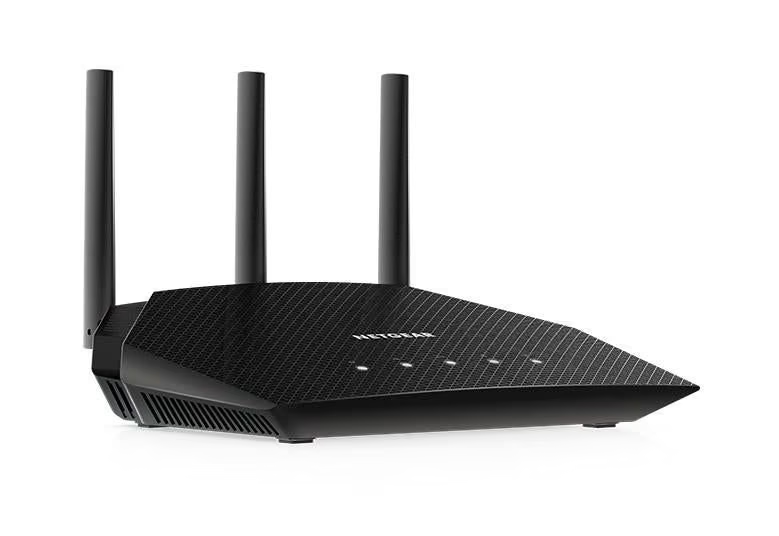
A dependable, budget-friendly Wi-Fi 6 router that covers the basics well for smaller Kiwi homes without much fuss. The RAX10 uses NETGEAR’s classic Nighthawk styling, a black, wing-shaped chassis with a diamond-textured top panel, three fixed external antennas angled upward, side vents, and a row of front-facing status lights. It has a moderate desktop footprint, noticeably more compact than many six or eight-antenna routers, meaning less shelf space needed. Around the back are five Gigabit Ethernet ports (1 WAN and 4 LAN) but no USB port, so there is no built-in file or printer sharing. It runs Wi-Fi 6 (802.11ax) dual-band, rated AX1800, delivering up to 600Mbps on 2.4GHz and 1200Mbps on 5GHz for a combined 1.8Gbps, driven by a quad-core 1.5GHz processor
NETGEAR says keeps 4K streaming and gaming smooth. NETGEAR pitches it for small to medium homes rather than larger properties, and setup runs through the Nighthawk app, which also handles speed tests and device management and works with Alexa and Google Assistant voice control. NETGEAR Armor adds cyber security with a trial included, though ongoing protection needs a paid subscription. The genuine trade-off is that this is an entry-level AX1800 unit, so its real-world throughput and range trail pricier AX5400 or tri-band routers, and the lack of a USB or multi-gig port limits it to a straightforward fibre or VDSL setup.
Pros
- Compact, budget Wi-Fi 6 router with combined 1.8Gbps AX1800 speeds
- Quad-core 1.5GHz processor for smooth 4K streaming and lag-free gaming
- Simple Nighthawk app setup with voice assistant support and a NETGEAR Armor security trial
Cons
- Entry-level AX1800 speed trails pricier AX5400 or tri-band routers
- No USB port for storage or printer sharing
- Ongoing NETGEAR Armor protection requires a paid subscription after the trial ends
Key specs: Wi-Fi 6 (802.11ax) dual-band AX1800 (600+1200Mbps), 5x Gigabit ports (1 WAN/4 LAN), quad-core 1.5GHz CPU, model RAX10.
3. ASUS TUF Gaming BE3600 – Best for gaming
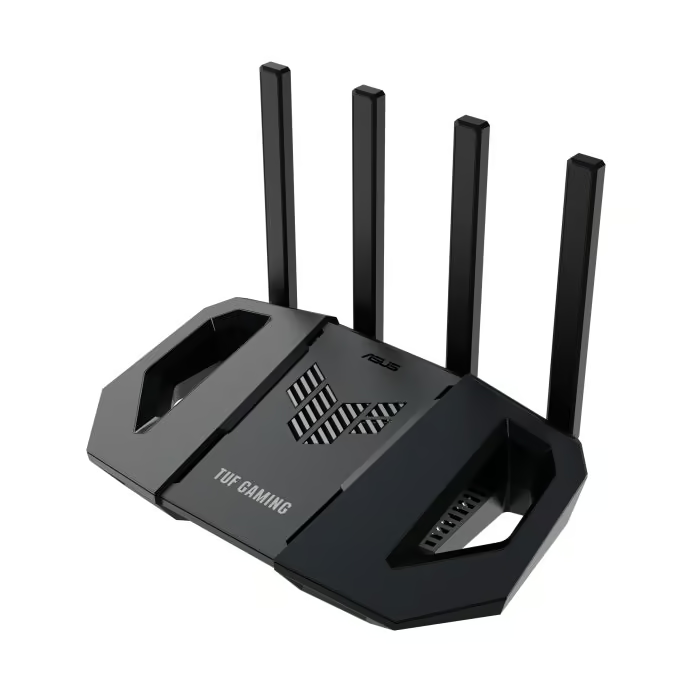
A genuinely capable step into WiFi 7 that shows its gaming pedigree in every angle. The ASUS TUF Gaming BE3600 borrows its look from drone design, with a wing-shaped black chassis, four external antennas, and a hollow cutout on each side that aids heat dissipation via nanocarbon-coated aluminium heatsinks. It has a reasonably compact footprint for a gaming router, finished entirely in black with angular TUF Gaming branding across the front vents. Around the back sits a 2.5Gbps WAN/LAN port, a dedicated 1Gbps gaming port that auto-prioritises traffic, standard Gigabit LAN ports, and a USB port that supports 4G/5G mobile broadband as a failover connection.
It runs WiFi 7 (802.11be) across dual bands, rated for combined wireless speeds up to 3600Mbps using 4K-QAM modulation, powered by a quad-core 2.0GHz processor with 1GB of RAM. AiMesh support means it can work as a primary router or a node in a larger mesh setup. Setup runs through the ASUS Router app, which owners describe as quick and intuitive for pairing, though some advanced settings are only accessible via the web admin portal rather than the app. Mobile Game Mode lets you optimise a specific game’s traffic with a tap, and three separate SSIDs split off kids, IoT and VPN traffic. The main trade-off is that despite being a WiFi 7 device it remains dual-band rather than tri-band, and with only one 2.5GbE port, wiring multiple multi-gig devices around the house will need an additional switch.
Pros
- WiFi 7 speeds with a 2.5Gbps port and a dedicated auto-prioritising gaming port
- AiMesh support for whole-home mesh expansion
- Quick, app-guided setup with handy extras like Mobile Game Mode and three separate SSIDs
Cons
- Dual-band only despite WiFi 7 branding, not the tri-band found on flagship routers
- Just one 2.5GbE port limits how many multi-gig devices can be wired directly
- Wi-Fi 7 client devices are still uncommon, so day-to-day gains are limited for now
Key specs: WiFi 7 (802.11be) dual-band, combined speeds up to 3600Mbps, 1x 2.5Gbps port + dedicated gaming port + Gigabit LAN, model TUF-BE3600.
4. D-Link DSL-X3052E – Best modem router combo for VDSL/ADSL connections
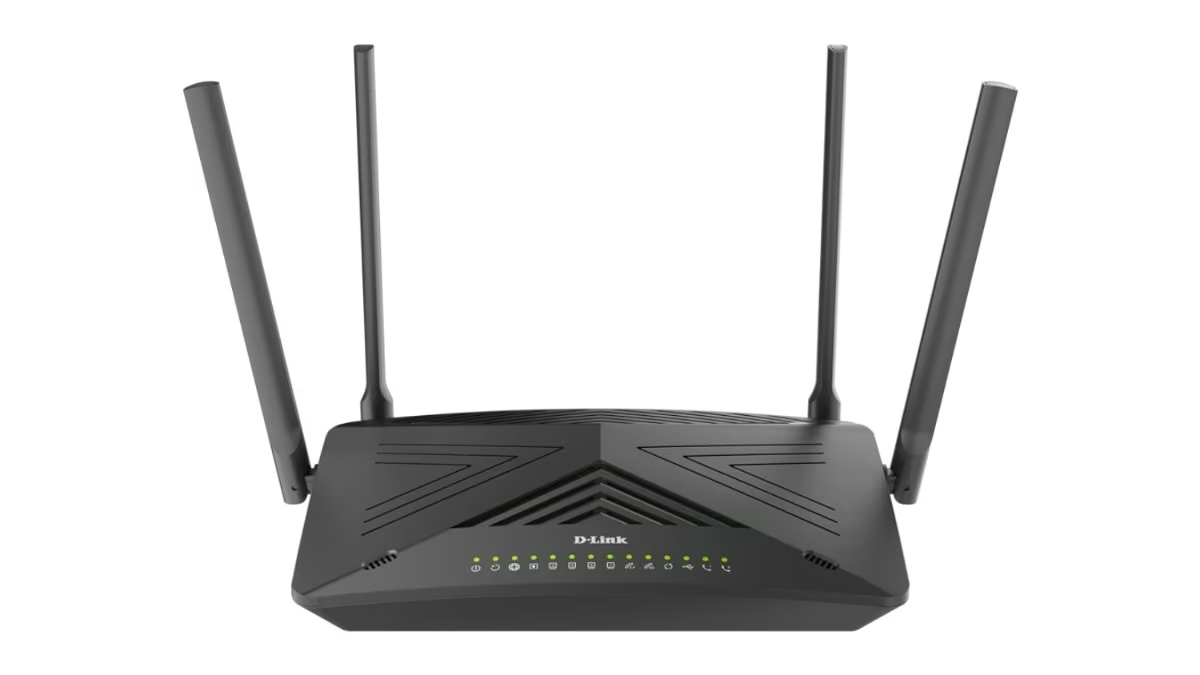
A genuine two-in-one for New Zealand homes still on VDSL or ADSL, pairing a built-in modem with capable Wi-Fi 6. The D-Link DSL-X3052E is finished in black with an angular, chevron-patterned top panel and high-gain antennas with built-in power amplifiers for extended reach. As a modem router combo, it has a built-in VDSL2/ADSL2+ modem, meaning there is no need for a separate copper modem on VDSL or ADSL connections, useful for households not yet on UFB fibre. Around the back it offers a Gigabit WAN port, four Gigabit LAN ports, the integrated DSL modem, and two VoIP ports so it can double as a phone base station over the internet. It runs dual-band Wi-Fi 6 (802.11ax), rated for up to 574Mbps on 2.4GHz and 2400Mbps on 5GHz using 160MHz-wide channels, backed by OFDMA, MU-MIMO and 1024-QAM for handling multiple devices, with WPA3 covering security. Setup is handled through a setup wizard described as getting the router running in a few clicks. The main trade-off is that a household already on UFB fibre gains little from the built-in DSL modem circuitry, effectively paying for hardware they will never touch, and there is no 2.5Gbps or multi-gig port, so it is not aimed at the fastest fibre plans either.
Pros
- Built-in VDSL2/ADSL2+ modem, so it doubles as an all-in-one modem and router for NZ copper broadband connections
- Wi-Fi 6 dual-band speeds up to 2400Mbps on 5GHz with OFDMA, MU-MIMO and 1024-QAM
- Two built-in VoIP ports for landline phone service alongside four Gigabit LAN ports
Cons
- Built-in DSL modem is unused hardware for fibre/UFB-only households
- No 2.5Gbps or multi-gig port, capping wired speeds at Gigabit even though wireless can go faster
- Combined modem, router and VoIP setup is more involved than a plain router
Key specs: Wi-Fi 6 (802.11ax) dual-band AX3000 (574Mbps + 2400Mbps), built-in VDSL2/ADSL2+ modem, 1x Gigabit WAN + 4x Gigabit LAN + 2x VoIP, model DSL-X3052E.
5. GL.iNet Opal (GL-SFT1200) – Best travel/portable router
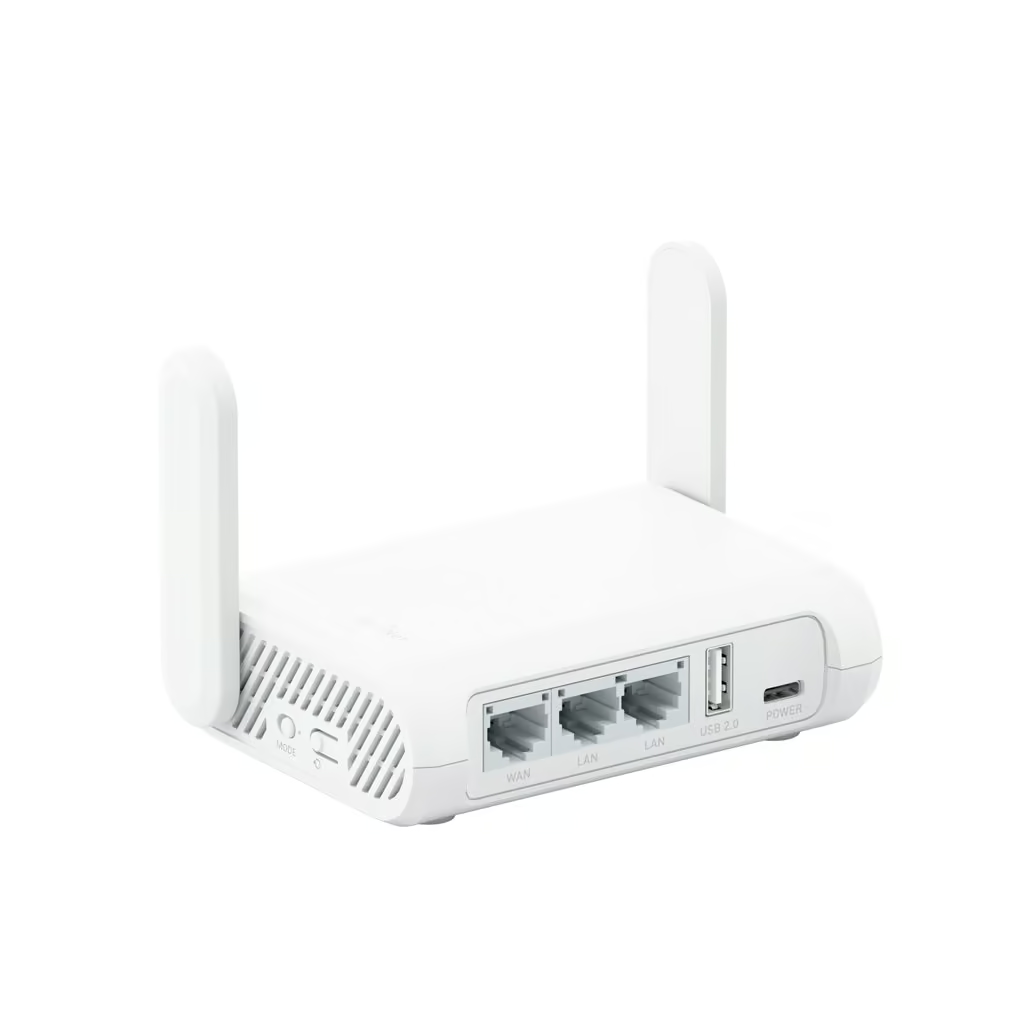
A shirt-pocket travel router built for VPN privacy rather than outright speed. The Opal (GL-SFT1200) is GL.iNet’s smallest travel router, a minimalist white box measuring just 118 x 85 x 30mm and weighing 145g, with two undetachable external Wi-Fi antennas and a Type-C power input. Around the back sit a WAN Ethernet port, two Gigabit LAN ports and a single USB 2.0 port for tethering a 3G/4G modem, alongside a reset button and toggle switch. Wi-Fi is dual-band 802.11ac (Wi-Fi 5) rated at 300Mbps on 2.4GHz and 867Mbps on 5GHz, an AC1200-class pairing that will not trouble the latest Wi-Fi 6 or 7 hardware but is plenty for a hotel room, small apartment or student flat.
The real drawcard is software: Opal runs a customised OpenWrt build with a simplified admin panel for casual setup and access to thousands of plug-ins for tinkerers, plus OpenVPN and WireGuard pre-installed alongside Cloudflare DNS-over-TLS for encrypted lookups, letting it double as a personal VPN gateway for up to 52 connected devices. GL.iNet’s own figures show the trade-off clearly: WireGuard throughput tops out around 65Mbps and OpenVPN at just 12Mbps in client mode, so a fast fibre connection will bottleneck hard once the VPN is switched on. With only two LAN ports and USB 2.0 rather than 3.0, it is built purely as a portable companion, not a home router replacement, but for travellers wanting a secured, pocketable Wi-Fi hub it does the job well.
Pros
- Genuinely pocket sized (118 x 85 x 30mm, 145g) with several ways to get online, including tethering and 3G/4G USB modems
- OpenVPN and WireGuard pre-installed with support for 30+ VPN providers, plus Cloudflare DNS-over-TLS
- Runs full OpenWrt with thousands of plugins for advanced users, alongside a simplified setup path for beginners
Cons
- VPN throughput is capped low (WireGuard around 65Mbps, OpenVPN around 12Mbps in client mode), bottlenecking fast home broadband
- Only 2 LAN ports and a USB 2.0 (not 3.0) port, so it can’t substitute for a full home router
- Wi-Fi 5 (802.11ac) dual-band speeds (867Mbps max) are modest next to newer Wi-Fi 6/7 travel routers
Key specs: Wi-Fi 5 (802.11ac) dual-band AC1200 (300Mbps + 867Mbps), 3x Gigabit ports (1 WAN/2 LAN) + 1x USB 2.0, model GL-SFT1200 (Opal).
6. TP-Link Archer BE550 – Best premium / Wi-Fi 7
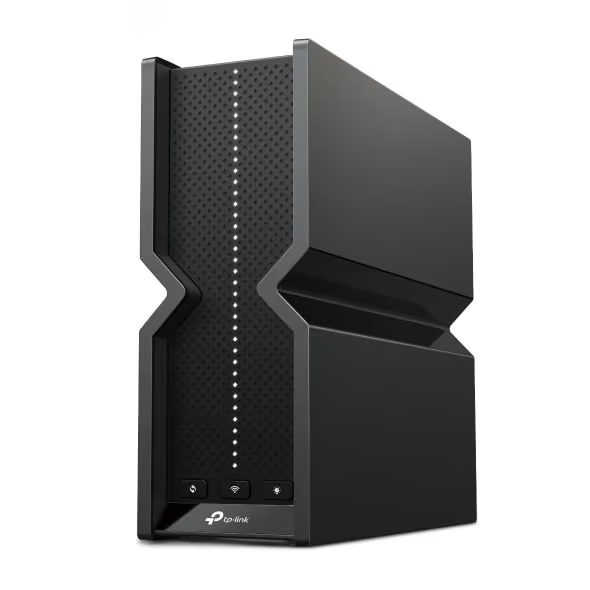
A genuinely capable Wi-Fi 7 upgrade that will not break the network budget. The Archer BE550 ditches the spiky, antler-antenna look of older TP-Link routers for a slim vertical tower design with a perforated black vent pattern running down one face, its internals housing six internal antennas rather than external rods. On the back sit five 2.5Gbps ports (one WAN, four LAN), a welcome jump over the Gigabit ports still common at this level, plus a single USB 3.0 port for network storage or printer sharing.
As a tri-band BE9300 router it runs Wi-Fi 7 (802.11be) across 6GHz, 5GHz and 2.4GHz for a combined 9300-class rating, with Multi-Link Operation, 320MHz channels and 4K-QAM adding real throughput and latency gains over Wi-Fi 6 gear. Setup runs through the Tether app or the web interface, with TP-Link HomeShield adding parental controls and threat scanning, and the router is EasyMesh-compatible if you later want to add a satellite unit.
Owner feedback on retailer pages is largely positive, praising easy setup and a clear jump in coverage over ISP-supplied routers, though a couple of reviewers noted the fixed, internal antennas cap outright range compared to routers with adjustable external aerials. The real trade-off is that Wi-Fi 7 client devices, especially ones supporting the 6GHz band, are still uncommon in NZ homes, so a lot of its headline speed is future-proofing rather than an immediate gain.
Pros
- Genuine tri-band Wi-Fi 7 (BE9300) including the 6GHz band, with Multi-Link Operation for lower latency
- Five 2.5Gbps ports (1 WAN + 4 LAN), well ahead of the Gigabit-only ports common at this price point
- Easy Tether app setup with EasyMesh support if you want to expand coverage later
Cons
- Wi-Fi 7 client devices are still uncommon, limiting immediate real-world gains
- Internal, fixed antennas cap outright range versus routers with adjustable external aerials
- Only one USB 3.0 port and no 10Gbps port (reserved for pricier Archer models)
Key specs: Wi-Fi 7 (802.11be) tri-band BE9300, 5x 2.5Gbps ports (1 WAN/4 LAN) + 1x USB 3.0, 6 internal antennas, model Archer BE550.
7. TP-Link Deco X20 – Best mesh system for whole-home coverage
The TP-Link Deco X20 3-pack delivers dependable whole-home Wi-Fi 6 coverage without the price tag of a flagship mesh system. Each Deco unit is a small white cube-shaped unit with four antennas built in internally rather than external aerials, so the units look tidy sitting on a shelf or sideboard in a neutral colour that suits most Kiwi living rooms. Round the back sit just two Gigabit ports per unit, auto-sensing between WAN and LAN roles, enough for the fibre connection plus one wired device like a smart TV. This is a dual-band Wi-Fi 6 (802.11ax) system rated up to 1.8Gbps combined (1201Mbps on 5GHz and 574Mbps on 2.4GHz), with WPA3 security, an SPI firewall, MU-MIMO, OFDMA and TP-Link’s AI-driven mesh roaming keeping devices locked onto the strongest unit as you move through the house. Setup is handled entirely through the Deco app in three guided steps, which lets you run speed tests, set up a guest network and parental controls through the HomeShield suite.
TP-Link rates the 3-pack for four-to-six-bedroom houses and roughly 530 square metres of coverage with Ethernet backhaul, supporting more than 150 connected devices without the performance dropping off. The genuine trade-off is speed: AX1800 is an entry-level ceiling for a Wi-Fi 6 mesh system, so households on faster UFB fibre plans chasing maximum single-device throughput may find it limiting, and two ports per unit leaves little room for extra wired gear.
Pros
- Compact, unobtrusive white cube design that disappears into most rooms
- Simple Deco app setup with guest network, parental controls and built-in speed tests
- Solid whole-home coverage (around 530 square metres claimed) and support for up to 150 devices across the 3-pack
Cons
- AX1800 speed ceiling is modest for a Wi-Fi 6 mesh system, limiting maximum throughput
- Only two Gigabit ports per unit, leaving little room for wired devices
- Buying three units costs more overall than a single high-end router covering similar ground
Key specs: Wi-Fi 6 (802.11ax) dual-band AX1800 (1201Mbps @5GHz + 574Mbps @2.4GHz) per unit, 2x Gigabit ports per unit, WPA3, Deco X20 (3-pack).
How to choose the best wifi router in NZ
Check the WiFi generation. Wi-Fi 6 is the current mainstream standard and handles a busy household of phones, laptops, smart TVs and smart home devices well. Wi-Fi 7 adds higher theoretical speeds and multi-link operation for future-proofing, useful for gaming or 4K streaming across many devices, but costs more and needs Wi-Fi 7 devices to fully benefit.
Match the router to your connection type. Most NZ homes on UFB fibre only need a standalone router plugged into the ONT, while homes still on a VDSL or ADSL copper connection need a modem router that dials in itself. Buying the wrong type means paying for a modem you don’t need, or missing one you do.
Consider a mesh system for a bigger home. A single router, even a powerful one, can struggle to cover a large house, multiple floors or thick walls. A mesh system spreads two or more units around the home for consistent coverage, at the cost of a higher price and more units to set up and power.
Check ports and features that matter day to day. Gigabit or faster wired ports matter for anything plugged in directly, like a smart TV, games console or NAS. A stronger router also helps devices that rely on a steady connection, such as security cameras or a webcam for video calls. Look for WPA3 security, a straightforward app for setup, and parental controls if the household has kids online.
Think about where the router will sit. A router works best in an open, central spot rather than a cupboard or corner, since walls and distance both weaken the signal. Anyone with an existing dead zone rather than starting from scratch may get better value from a WiFi extender than a full router replacement.
Frequently Asked Questions
What’s the difference between a router and a modem?
A modem connects your home to the internet, converting the fibre or copper signal into data your network understands, while a router shares that connection wirelessly and via cables across your devices. On NZ’s UFB fibre, the ONT box on the wall already acts as the modem, so most homes only need a standalone router.
Do I need a new router for UFB fibre?
Not always. UFB fibre uses an ONT on the wall as the modem, so most modern routers that plug into it will work, provided they support VLAN tagging if your provider requires it. If you’re moving from VDSL or ADSL to fibre, upgrading to a Wi-Fi 6 router is worthwhile, since fibre speeds often outpace an older router’s wireless capability.
What is Wi-Fi 6 and do I need it?
Wi-Fi 6 (802.11ax) is the current wireless standard, offering faster speeds, better performance in crowded homes with many connected devices, improved battery efficiency, and stronger built-in security than Wi-Fi 5. For NZ households on UFB fibre with multiple streaming devices, a Wi-Fi 6 router or mesh system makes noticeably better use of a fast connection.
Is mesh wifi better than a router with an extender?
Mesh systems use multiple units sharing one network name, handing devices off seamlessly as you move through the house, which suits larger NZ homes or multi-storey properties with dead zones. A single extender is cheaper and fine for boosting one weak spot, but can create a separate network name and slower speeds if overused.
How can I improve wifi coverage at home?
Place your router centrally, off the floor, and away from microwaves, thick walls, and metal objects. Switch the 2.4GHz channel to 1, 6, or 11 to cut interference, and hardwire stationary devices like smart TVs where possible. If dead zones persist in a larger NZ home, a mesh Wi-Fi system usually fixes it better than a single extender.
How often should I replace my wifi router?
Most experts recommend replacing a router every three to five years, or sooner if it stops receiving firmware updates, struggles with newer devices, or your NZ broadband plan is upgraded, such as moving to a faster UFB fibre tier. Frequent drop-outs, overheating, or a lack of Wi-Fi 6 support are also signs it’s time for a new one.
Verdict
There is no single best wifi router for every NZ home, only the right router for the connection and the space. The TP-Link Archer AX72 is the best all-round Wi-Fi 6 router, the NETGEAR AX1800 is the best budget pick, and the ASUS TUF Gaming BE3600 is built for low-latency gaming.
Anyone still on a VDSL or ADSL connection is better served by the D-Link modem router combo, frequent travellers by the compact GL.iNet Opal, and larger homes by the TP-Link Deco X20 mesh system. The TP-Link Archer BE550 is the pick for buyers who want to get ahead of the curve with Wi-Fi 7. Match the router to the connection type and home size first, and treat top theoretical speeds as a secondary factor. A faster, more reliable router also pays off for anyone running a laptop or other bandwidth-hungry devices on the same network.
