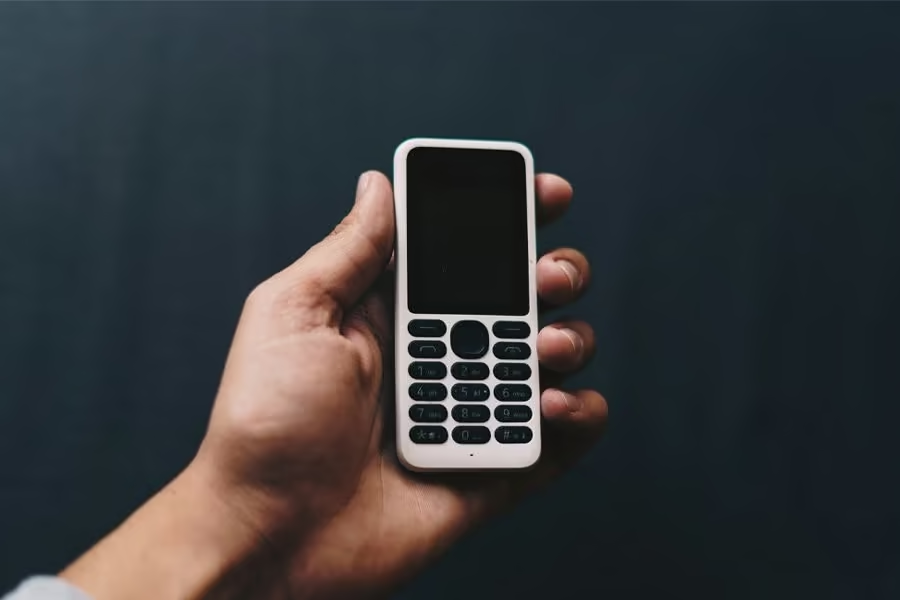
The best phone for most seniors in New Zealand is a simple 4G flip or big-button phone with an SOS key, loud and clear audio, and easy-to-press keys. Just as important, it has to support 4G VoLTE, because NZ switched off its 2G and 3G networks between January and March 2026, so older handsets can no longer make calls, including 111 emergency calls. This guide compares 8 senior-friendly phones, from the fuss-free Nokia 105 to the Oricom EZY7510 with GPS location alerts, and explains which one suits calls only, texting, hearing aids or emergency safety.
Quick comparison: 8 best senior phones in NZ
| Phone | Best for | Standout feature |
|---|---|---|
| Artfone 4G Foldable | Best overall easy flip | Dual colour display, dock, rear SOS |
| Nokia 105 4G 2nd Edition | Simplest calls and texts | Removable battery, IP54 |
| Opel Lite Flip 4G | Compact, simple flip | Large-number keypad, photo contacts |
| Snap QWERTY Flip | Seniors who text a lot | Full QWERTY keyboard |
| Opel TouchFlip 4G | Hearing aid users, WhatsApp | M4/T4 rating, touchscreen |
| Opel Flipfold 4G | Big buttons with an emergency key | 2.8 inch screen, backlit keys |
| Oricom EZY7510 | SOS with GPS location alerts | Talking keypad, +30 dB volume |
| Maxcom MM828 | European-made simple flip | Dual SIM, photo contacts |
1. Artfone 4G Foldable Senior Phone
Best for: the best overall easy flip phone. The Artfone 4G foldable is the pick many NZ families reach for first, because it combines a dual colour display, a proper charging dock and a rear SOS button in one simple flip.
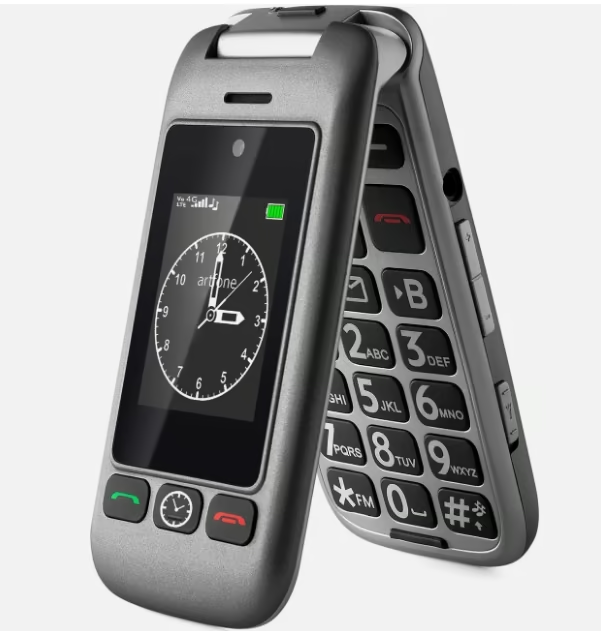
It is a compact clamshell that slips into a pocket or handbag. The outer colour screen shows the time, date and caller without opening the phone, while the inner display carries large fonts and icons. Owners report the hinge feels reassuringly firm, and Artfone rates it for around 120,000 flips. The backlit keypad has widely spaced, tactile keys, and a talking-numbers function reads each digit aloud as it is pressed, which reviewers note helps users with low vision dial without mistakes. Flip-to-answer means no fiddly button to accept a call, and a side torch button, FM radio, Bluetooth and an MP3 player round out the everyday features.
The SOS button on the back can store up to five emergency contacts and dials them in turn until someone answers. The bundled desktop dock removes the need to line up a small USB-C plug, which matters for arthritic hands.
Pros:
- Dual colour display shows calls without opening the phone
- Charging dock and talking numbers help less dexterous users
- Rear SOS button dials up to five contacts
Cons:
- The 0.3MP camera is basic and low resolution
- Best for calls, texts and safety rather than photos
Key specs: Artfone 4G foldable senior phone; dual colour display; USB-C; charging dock; FM radio; Bluetooth; MP3; torch.
2. Nokia 105 4G 2nd Edition (2024)
Best for: the simplest, most affordable calls-and-texts backup. For a senior who only wants to make calls and send the odd text, the Nokia 105 4G 2nd Edition is the most fuss-free option here.
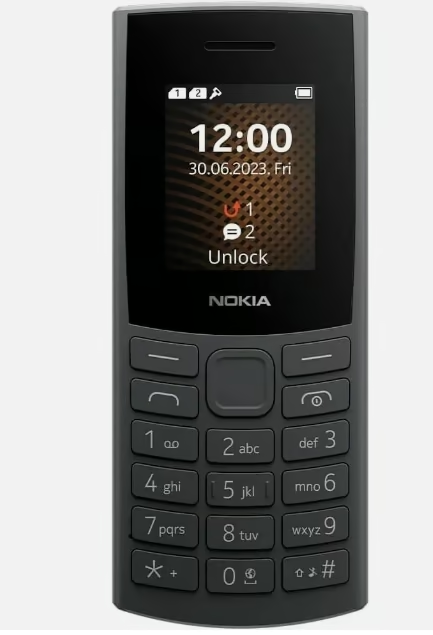
It is a small candybar phone (about 121 x 50 x 14 mm and 93 g) with a 1.77 inch colour screen and a classic Nokia keypad most older users will recognise instantly. An IP54 rating means it shrugs off dust and light splashes, and HMD backs it with the drop-tolerant reputation Nokia basics are known for. There is no camera and no app store to get lost in, just a clear menu, big physical number keys and wireless FM radio. USB-C charging replaces the old micro-USB, and Bluetooth 5.0 lets it pair with a hearing device or speaker.
The removable 1450 mAh battery is a genuine strength. Nokia quotes multi-day standby, and a spare battery can be swapped in with no tools. Memory is expandable via microSD up to 32 GB for music.
Pros:
- Removable, swappable 1450 mAh battery with multi-day standby
- IP54 dust and splash resistance
- Very simple menu with no apps to cause confusion
Cons:
- Small 1.77 inch screen
- No camera and no messaging apps
Key specs: Nokia 105 4G 2nd Edition (2024); 1.77 inch display; 1450 mAh removable battery; USB-C; Bluetooth 5.0; IP54; dual SIM.
3. Opel Lite Flip 4G
Best for: a compact, distraction-free flip with a large-number keypad. The Lite Opel Flip is a small, light 4G flip phone from Opel Mobile, the Australian senior-phone brand also behind the TouchFlip in this guide, made for people who want calls and texts without smartphone clutter.
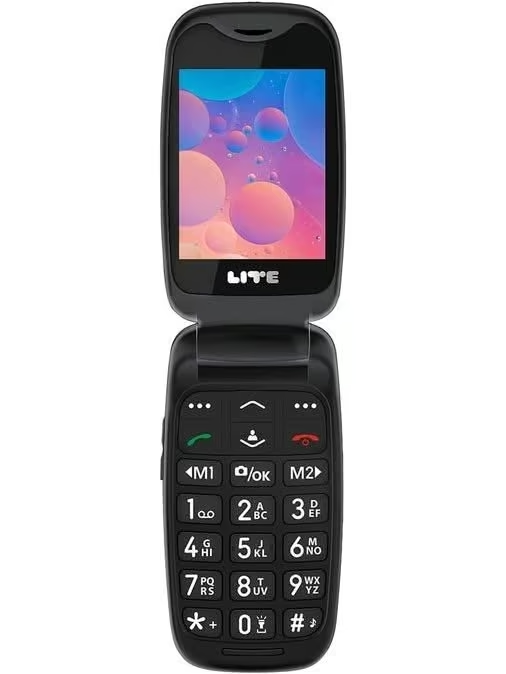
Opening the clamshell reveals a 2.4 inch colour screen above a large-number keypad with M1 and M2 memory keys, and the phone weighs about 96 g. It runs the simple Nucleus OS rather than Android, so the menus stay limited to the basics: calls, texts, photo contacts, FM radio and a camera with flash. USB-C charging, a 3.5 mm headphone jack and Bluetooth are included, and it carries a one-year manufacturer warranty. The 1000 mAh battery is on the small side, and the listing does not mention an SOS button or a hearing-aid rating. It is also very new, with almost no owner reviews yet and stock that has come and gone, so check availability before settling on it.
Seniors comparing a flip phone with affordable everyday smartphones often find a phone like this easier to live with: physical keys, fewer menus and a screen that is protected when the lid is closed.
Pros:
- Small, light flip with a large-number keypad
- Simple Nucleus OS with photo contacts and FM radio
- USB-C, 3.5 mm jack and Bluetooth
Cons:
- No SOS button or hearing-aid rating listed
- Small 1000 mAh battery and very few owner reviews so far
Key specs: Lite Opel Flip 4G; 2.4 inch TFT display; Nucleus OS; 1000 mAh battery; USB-C; 3.5 mm jack; Bluetooth; FM radio; photo contacts; about 96 g; 1-year warranty.
4. Snap QWERTY Flip Phone
Best for: seniors who text a lot. The Snap flip phone stands out for one reason: a full physical QWERTY keyboard, which makes texting far easier for anyone who dislikes on-screen typing.
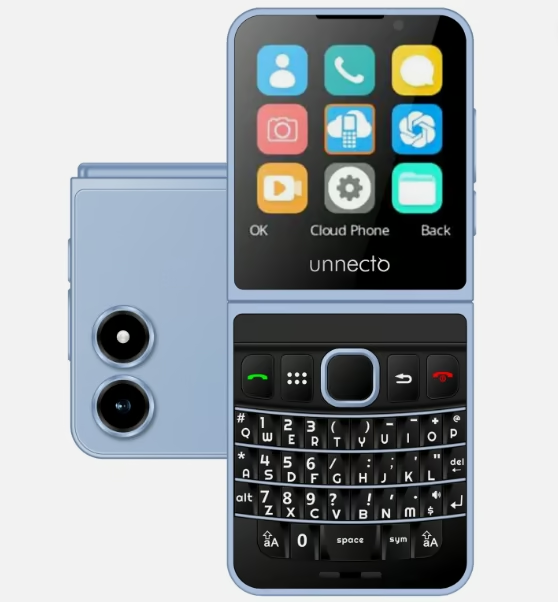
It is a modern clamshell with a textured shell for grip and a 2.51 inch display, offered in colours including pink, blue and orange. The QWERTY keys let users tap out messages with real tactile feedback, and the lightweight Cloud Phone OS keeps the menus simple rather than smartphone-complicated. Bluetooth 5.0 and USB-C charging are included, plus a 2MP camera. Dual SIM and 4G LTE support mean it keeps working on modern networks, and microSD expansion to 32 GB covers extra storage.
Pros:
- Full physical QWERTY keyboard for easy texting
- Textured grip and simple Cloud Phone OS
- Dual SIM, USB-C and microSD support
Cons:
- Small 1000 mAh battery needs charging more often
- Sold mainly as a US-market phone, so NZ buyers should confirm band support
Key specs: Snap (Unnecto Snap); 2.51 inch display; QWERTY keyboard; Cloud Phone OS; 1000 mAh; Bluetooth 5.0; USB-C; dual SIM; 2MP camera.
5. Opel Mobile TouchFlip 4G
Best for: hearing aid users and WhatsApp. The Opel Mobile TouchFlip is the standout for hearing aid wearers, thanks to an M4/T4 rating, the highest hearing-aid-compatibility grade, and it is genuinely sold and supported in New Zealand.
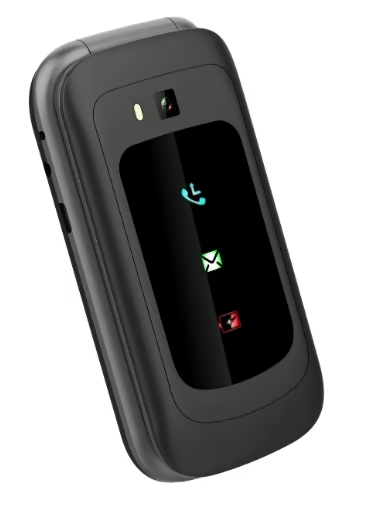
It is an unusual hybrid: a flip phone with a touchscreen behind the lid and big tactile buttons below, so seniors can choose to tap or type. Because it supports WhatsApp, families can stay in touch through the same app they already use, while the big-button keypad keeps calling and texting simple. An SOS emergency function calls preset contacts and sends alert messages, and Bluetooth is built in. The M4/T4 hearing-aid rating means clearer calls with far less interference for hearing-aid users, and 4G VoLTE keeps it working now that NZ’s 3G network has closed.
If audio clarity is the priority, it is also worth pairing a phone like this with a set of wireless earbuds that connect over Bluetooth for hands-free calls around the house.
Pros:
- M4/T4 hearing aid compatibility, the highest grade
- Supports WhatsApp for family messaging
- Sold and supported in New Zealand
Cons:
- Touchscreen adds a small learning curve
- Better for a confident user than an absolute beginner
Key specs: Opel Mobile TouchFlip (OMTF22B); 4G VoLTE; M4/T4 hearing aid compatible; touchscreen plus keypad; SOS function; Bluetooth.
6. Opel Mobile Flipfold 4G
Best for: big backlit buttons with an emergency key. The Opel Mobile Flipfold is a straightforward 4G flip phone built around large backlit buttons and a dedicated emergency button, from the same Opel Mobile range as the TouchFlip above.
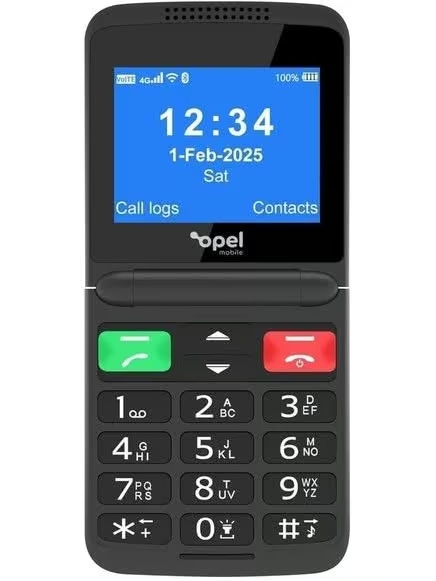
Its 2.8 inch screen is one of the larger displays among the flip phones here, and the bright, clear layout makes messages and caller details easy to read. The backlit keys help in low light, the emergency button gives a quick way to reach help, and an expandable memory slot adds room for contacts and photos. Charging is by USB-C. The listing’s spec table is patchy and contradicts itself on details such as the SIM type, so treat anything beyond the headline features with caution, and confirm 4G VoLTE support with your network before buying. There is no headphone jack and no water resistance, and owner feedback so far is limited and mixed.
Pros:
- Large backlit buttons for easier dialling
- Dedicated emergency button
- 2.8 inch screen with expandable memory
Cons:
- Patchy, contradictory listing specs
- No headphone jack or water resistance; few owner reviews
Key specs: Opel Mobile Flipfold 4G; 2.8 inch display (240 x 320); emergency button; backlit keypad; USB-C; Bluetooth; expandable memory; 1-year warranty.
7. Oricom EZY7510 Flip Phone
Best for: big-button safety with GPS location alerts and hearing-aid support. The Oricom EZY7510 is a 4G flip phone designed for older users, pairing a rear SOS button that shares the phone’s location with a talking keypad and boosted call volume.
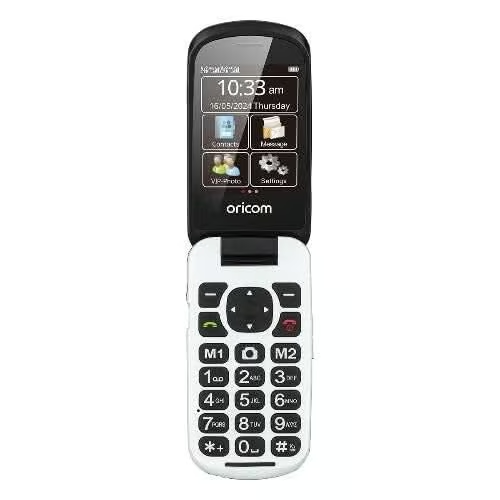
Pressing the SOS button on the back calls the saved emergency contacts, and when the phone has a 4G signal it also texts them a Google Maps link to its location, found by GPS or WiFi. The high-contrast keypad reads each number aloud as it is pressed, the receiver can be boosted by up to 30 dB, and the loud ringer and hearing aid and T-coil compatibility help users with hearing loss. A dual colour display, dual SIM slots, microSD to 32 GB and a 2MP camera round it out, along with a phonebook, calendar, calculator and alarm. Oricom is an Australian brand and backs it with a 12-month warranty. The 1200 mAh battery is modest, so plan on regular charging, and the listing does not quote an M or T hearing-aid grade.
Pros:
- SOS button sends a GPS location link to contacts
- Talking keypad and up to 30 dB louder calls
- Hearing aid and T-coil compatible
Cons:
- Modest 1200 mAh battery
- Hearing-aid grade (M/T rating) not stated
Key specs: Oricom EZY7510; 4G; 2.8 inch dual colour display; rear SOS button with GPS location SMS; talking keypad; +30 dB receiver; hearing aid and T-coil compatible; dual SIM; microSD to 32 GB; 2MP camera; 1200 mAh battery; USB-C; 12-month warranty.
8. Maxcom MM828
Best for: a European-made simple flip with dual SIM. The Maxcom MM828 Comfort is a straightforward 4G flip from an established European maker, aimed squarely at older users who want reliability over features.
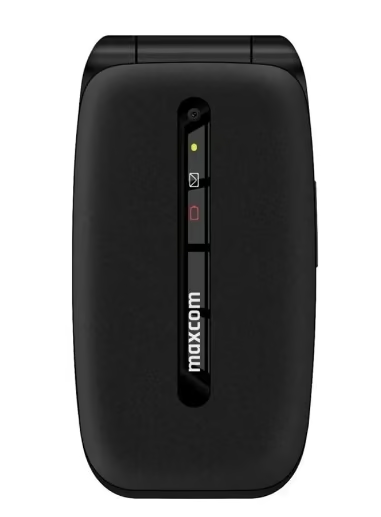
The 2.4 inch screen is easy to read and the large, comfortable keys are spaced for less confident fingers; it is available in blue and black. A simple menu, large fonts and a hands-free mode keep it approachable, and up to eight favourite contacts can be saved with a photo for quick recognition. USB-C charging and FM radio are included, plus a music player and voice recorder. A dedicated SOS button calls up to five stored numbers in sequence until someone answers, and dual SIM support is handy for seniors who travel or want separate work and personal numbers.
Pros:
- Established European maker with a simple, readable layout
- Dual SIM and up to eight photo contacts
- SOS button and USB-C charging
Cons:
- Small 1000 mAh battery, so shorter standby than the Nokia basics
- Tiny 0.08MP camera, not for photos
Key specs: Maxcom Comfort MM828 4G; 2.4 inch display; dual SIM; USB-C; SOS button; FM radio; up to 8 photo contacts.
How we chose these phones
Every phone in this guide was selected by researching and comparing manufacturer and New Zealand or Australian retailer specifications, then cross-checking them against verified owner reviews. The team did not physically test these models, so this is a research-based buying guide rather than a hands-on review. Priorities were 4G VoLTE support, which is now essential after the NZ 3G shutdown, hearing-aid compatibility, a working SOS button, button size and screen readability, battery life, and everyday ease of use for older hands and eyes. Rankings reflect how well each phone balances those factors for different needs, not a single best choice for everyone. For readers weighing a simple phone against a touchscreen, our guide to the latest full-featured smartphones covers the alternative, and easy-reading options like large-screen eReaders can suit seniors who mainly want to read.
For a different budget or use case, the guide to rugged phones covers the rest of the range.
The verdict
For most NZ seniors, an easy flip phone like the Artfone 4G Foldable or the hearing-aid-friendly Opel TouchFlip covers calls, texts and safety without confusion. Choose the Nokia 105 for the simplest calls-and-texts experience, the compact Opel Lite Flip for a distraction-free flip, the Snap for heavy texting, the Oricom EZY7510 for SOS alerts with GPS location and hearing-aid support, and the Opel Flipfold or Maxcom MM828 for big buttons with an emergency key. Whichever you pick, confirm it supports 4G VoLTE on Spark, One NZ or 2degrees before buying.
Big-button handsets are often older 3G stock that no longer works here, so check the model against current spark mobile phones before ordering one online.
Frequently Asked Questions
Are 3G phones being phased out in New Zealand?
Yes. New Zealand’s mobile providers switched off their 2G and 3G networks between January and March 2026. Any phone that relies on 3G can no longer make calls, texts or 111 emergency calls, so a phone for a senior must support 4G VoLTE on Spark, One NZ or 2degrees.
What is the easiest phone for an elderly person to use?
The easiest phones are simple 4G flip or big-button models with large physical keys, a bright high-contrast screen, loud clear audio and a menu limited to calls, texts and FM radio. Extras like a charging dock, talking numbers and a dedicated SOS button make daily use easier for older hands and eyes.
What should you look for in a phone for seniors?
Look for 4G VoLTE support, large tactile buttons, a readable screen with big fonts, a loud speaker and hearing-aid compatibility rated M3 or M4. An SOS button that dials emergency contacts, a long-life or removable battery, and a charging dock instead of a fiddly cable all add real everyday value.
What does hearing aid compatible M4/T4 mean?
Hearing-aid compatibility is graded on M and T scales, where M covers microphone use and T covers the telecoil setting. Ratings run from 1 to 4, and an M4/T4 phone is the highest grade, meaning it produces the least interference and the clearest sound for hearing-aid wearers during calls.
Do senior phones have an SOS button and how does it work?
Most senior phones include an SOS button, usually on the back. Pressing and holding it for a few seconds dials up to five saved emergency contacts one after another until someone answers, and many models also send those contacts an alert text, sometimes with the phone’s location, at the same time.
Do I need a special SIM or plan for a senior’s phone in NZ?
No special plan is needed. Any standard NZ SIM from Spark, One NZ, 2degrees or a smaller provider works, as long as the phone supports 4G VoLTE. A low-cost prepay or small monthly plan usually suits seniors who mainly call and text, and dual-SIM models let you keep an existing number.
Can flip phones use WhatsApp?
Some can. Most basic flip and button phones do not run WhatsApp, but a few 4G models built for seniors, such as the Opel Mobile TouchFlip, include it so families can message on the app they already use. If WhatsApp matters, check the listing confirms it before buying, as most simple phones lack it.
